
- Vrealmatic
- Unreal Engine Wiki
- Mass Framework
- Visualization
Visualization with Mass Framework
How to process visualization with Mass Framework. Mass Framework is an ECS for managing crowds and traffic, available since Unreal Engine 5.0. Engine code excerpts below were taken from UE 5.3 - check the source of your engine version (UE 5.8) for implementation details. Newer versions can also visualize entities with instanced skinned meshes (MassRepresentation) instead of vertex-animated static meshes.


Processing Visualization with MassGameplay built-in resources
Visualization traits help to manage the visual aspects of rendering and processing entities. They are part of MassGameplay buil-in plugin.
Visualization Traits inheritance
Visualization Traits work uses following fragments (beside others):
- FMassRepresentationFragment informing about LODs mattersFMassRepresentationFragment
USTRUCT() struct MASSREPRESENTATION_API FMassRepresentationFragment : public FMassFragment { GENERATED_BODY() EMassRepresentationType CurrentRepresentation = EMassRepresentationType::None; EMassRepresentationType PrevRepresentation = EMassRepresentationType::None; int16 HighResTemplateActorIndex = INDEX_NONE; int16 LowResTemplateActorIndex = INDEX_NONE; int16 StaticMeshDescIndex = INDEX_NONE; FMassActorSpawnRequestHandle ActorSpawnRequestHandle; FTransform PrevTransform; /** Value scaling from 0 to 3, 0 highest LOD we support and 3 being completely off LOD */ float PrevLODSignificance = -1.0f; };EMassRepresentationTypeUENUM() enum class EMassRepresentationType : uint8 { HighResSpawnedActor, LowResSpawnedActor, StaticMeshInstance, None, }; - FMassRepresentationLODFragment informing about entities visibilityFMassRepresentationLODFragment
USTRUCT() struct MASSREPRESENTATION_API FMassRepresentationLODFragment : public FMassFragment { GENERATED_BODY() /** LOD information */ TEnumAsByte<EMassLOD::Type> LOD = EMassLOD::Max; TEnumAsByte<EMassLOD::Type> PrevLOD = EMassLOD::Max; /** Visibility Info */ EMassVisibility Visibility = EMassVisibility::Max; EMassVisibility PrevVisibility = EMassVisibility::Max; /** Value scaling from 0 to 3, 0 highest LOD we support and 3 being completely off LOD */ float LODSignificance = 0.0f; };EMassLODUENUM() namespace EMassLOD { enum Type { High, Medium, Low, Off, Max }; }EMassVisibilityenum class EMassVisibility : uint8 { CanBeSeen, // Not too far and within camera frustum CulledByFrustum, // Not in camera frustum but within visibility distance CulledByDistance, // Too far whether in or out of frustum Max }; - FMassViewerInfoFragment - specifies viewer and frustrum distance
USTRUCT()
struct MASSLOD_API FMassViewerInfoFragment : public FMassFragment
{
	GENERATED_BODY()

	// Closest viewer distance
	float ClosestViewerDistanceSq;

	// Closest distance to frustum
	float ClosestDistanceToFrustum;
};
Visualization Trait
Built-in MassGameplay Trait located At UE5/Engine/Plugins/Runtime/MassGameplay/Source/MassRepresentation
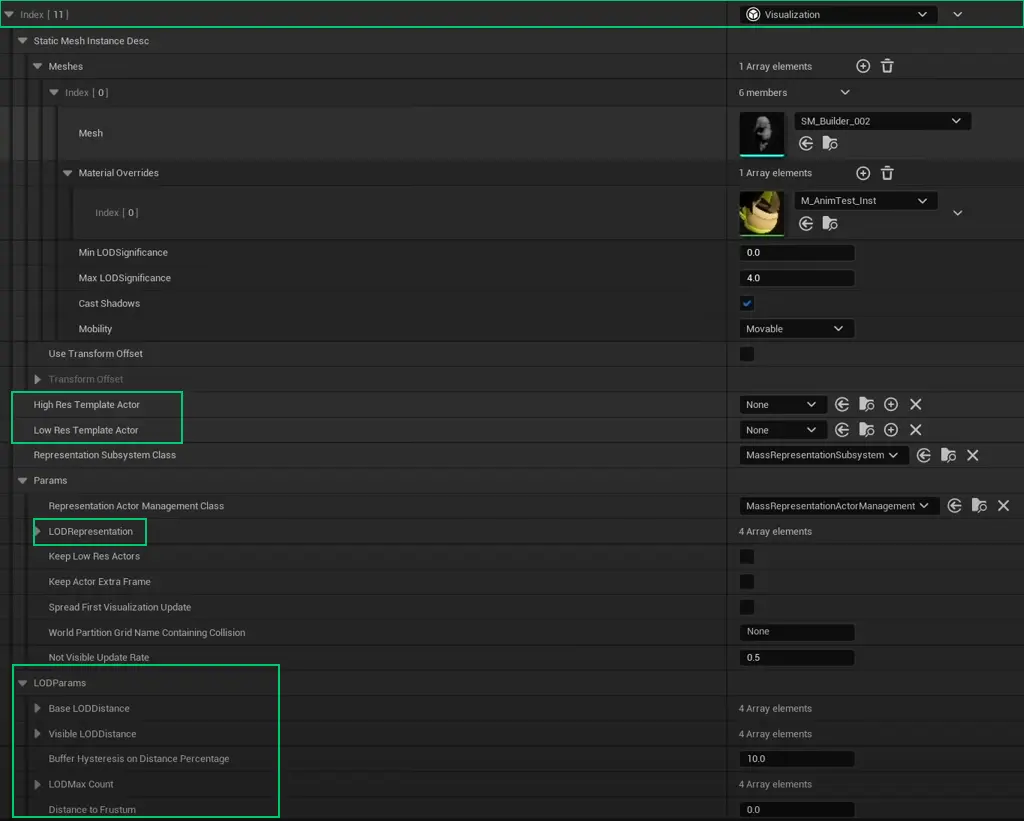
UCLASS(meta=(DisplayName="Visualization"))
class MASSREPRESENTATION_API UMassVisualizationTrait : public UMassEntityTraitBase
{
	GENERATED_BODY()
public:
	UMassVisualizationTrait();

	virtual void BuildTemplate(FMassEntityTemplateBuildContext& BuildContext, const UWorld& World) const override;

	/** Instanced static mesh information for this agent */
	UPROPERTY(EditAnywhere, Category = "Mass|Visual")
	FStaticMeshInstanceVisualizationDesc StaticMeshInstanceDesc;

	/** Actor class of this agent when spawned in high resolution*/
	UPROPERTY(EditAnywhere, Category = "Mass|Visual")
	TSubclassOf<AActor> HighResTemplateActor;

	/** Actor class of this agent when spawned in low resolution*/
	UPROPERTY(EditAnywhere, Category = "Mass|Visual")
	TSubclassOf<AActor> LowResTemplateActor;

	/** Allow subclasses to override the representation subsystem to use */
	UPROPERTY(EditAnywhere, Category = "Mass|Visual")
	TSubclassOf<UMassRepresentationSubsystem> RepresentationSubsystemClass;

	/** Configuration parameters for the representation processor */
	UPROPERTY(EditAnywhere, Category = "Mass|Visual")
	FMassRepresentationParameters Params;

	/** Configuration parameters for the visualization LOD processor */
	UPROPERTY(EditAnywhere, Category = "Mass|Visual")
	FMassVisualizationLODParameters LODParams;
};UMassVisualizationTrait::UMassVisualizationTrait()
{
RepresentationSubsystemClass = UMassRepresentationSubsystem::StaticClass();
Params.RepresentationActorManagementClass = UMassRepresentationActorManagement::StaticClass();
Params.LODRepresentation[EMassLOD::High] = EMassRepresentationType::HighResSpawnedActor;
Params.LODRepresentation[EMassLOD::Medium] = EMassRepresentationType::LowResSpawnedActor;
Params.LODRepresentation[EMassLOD::Low] = EMassRepresentationType::StaticMeshInstance;
Params.LODRepresentation[EMassLOD::Off] = EMassRepresentationType::None;
LODParams.BaseLODDistance[EMassLOD::High] = 0.f;
LODParams.BaseLODDistance[EMassLOD::Medium] = 1000.f;
LODParams.BaseLODDistance[EMassLOD::Low] = 2500.f;
LODParams.BaseLODDistance[EMassLOD::Off] = 10000.f;
LODParams.VisibleLODDistance[EMassLOD::High] = 0.f;
LODParams.VisibleLODDistance[EMassLOD::Medium] = 2000.f;
LODParams.VisibleLODDistance[EMassLOD::Low] = 4000.f;
LODParams.VisibleLODDistance[EMassLOD::Off] = 10000.f;
LODParams.LODMaxCount[EMassLOD::High] = 50;
LODParams.LODMaxCount[EMassLOD::Medium] = 100;
LODParams.LODMaxCount[EMassLOD::Low] = 500;
LODParams.LODMaxCount[EMassLOD::Off] = 0;
LODParams.BufferHysteresisOnDistancePercentage = 10.0f;
LODParams.DistanceToFrustum = 0.0f;
LODParams.DistanceToFrustumHysteresis = 0.0f;
}
void UMassVisualizationTrait::BuildTemplate(FMassEntityTemplateBuildContext& BuildContext, const UWorld& World) const
{
// This should not be ran on NM_Server network mode
if (World.IsNetMode(NM_DedicatedServer))
{
return;
}
BuildContext.RequireFragment<FMassViewerInfoFragment>();
BuildContext.RequireFragment<FTransformFragment>();
BuildContext.RequireFragment<FMassActorFragment>();
FMassEntityManager& EntityManager = UE::Mass::Utils::GetEntityManagerChecked(World);
UMassRepresentationSubsystem* RepresentationSubsystem = Cast<UMassRepresentationSubsystem>(World.GetSubsystemBase(RepresentationSubsystemClass));
if (RepresentationSubsystem == nullptr)
{
UE_LOG(LogMassRepresentation, Error, TEXT("Expecting a valid class for the representation subsystem"));
RepresentationSubsystem = UWorld::GetSubsystem<UMassRepresentationSubsystem>(&World);
check(RepresentationSubsystem);
}
FMassRepresentationSubsystemSharedFragment SubsystemSharedFragment;
SubsystemSharedFragment.RepresentationSubsystem = RepresentationSubsystem;
uint32 SubsystemHash = UE::StructUtils::GetStructCrc32(FConstStructView::Make(SubsystemSharedFragment));
FSharedStruct SubsystemFragment = EntityManager.GetOrCreateSharedFragmentByHash<FMassRepresentationSubsystemSharedFragment>(SubsystemHash, SubsystemSharedFragment);
BuildContext.AddSharedFragment(SubsystemFragment);
if (!Params.RepresentationActorManagementClass)
{
UE_LOG(LogMassRepresentation, Error, TEXT("Expecting a valid class for the representation actor management"));
}
FConstSharedStruct ParamsFragment = EntityManager.GetOrCreateConstSharedFragment(Params);
ParamsFragment.Get<FMassRepresentationParameters>().ComputeCachedValues();
BuildContext.AddConstSharedFragment(ParamsFragment);
FMassRepresentationFragment& RepresentationFragment = BuildContext.AddFragment_GetRef<FMassRepresentationFragment>();
RepresentationFragment.StaticMeshDescIndex = RepresentationSubsystem->FindOrAddStaticMeshDesc(StaticMeshInstanceDesc);
RepresentationFragment.HighResTemplateActorIndex = HighResTemplateActor.Get() ? RepresentationSubsystem->FindOrAddTemplateActor(HighResTemplateActor.Get()) : INDEX_NONE;
RepresentationFragment.LowResTemplateActorIndex = LowResTemplateActor.Get() ? RepresentationSubsystem->FindOrAddTemplateActor(LowResTemplateActor.Get()) : INDEX_NONE;
FConstSharedStruct LODParamsFragment = EntityManager.GetOrCreateConstSharedFragment(LODParams);
BuildContext.AddConstSharedFragment(LODParamsFragment);
uint32 LODParamsHash = UE::StructUtils::GetStructCrc32(FConstStructView::Make(LODParams));
FSharedStruct LODSharedFragment = EntityManager.GetOrCreateSharedFragmentByHash<FMassVisualizationLODSharedFragment>(LODParamsHash, LODParams);
BuildContext.AddSharedFragment(LODSharedFragment);
BuildContext.AddFragment<FMassRepresentationLODFragment>();
BuildContext.AddTag<FMassVisibilityCulledByDistanceTag>();
BuildContext.AddChunkFragment<FMassVisualizationChunkFragment>();
}Visualization trait shared fragment options offers the option of using a static mesh instance or actors.
For the building simulation example, there's sufficient to only use instance static meshes, as there's not an expectation that the camera to get close enough to the agents.
For a project where the camera can really go close to characters, it will be better to have a high and low actor version and mix that solution with a static mesh instance.
The visualization processor needs some fragments that are not added in the trait that we are using. And that's why we have a trait called Assorted Fragments that allow us to add specific fragments.
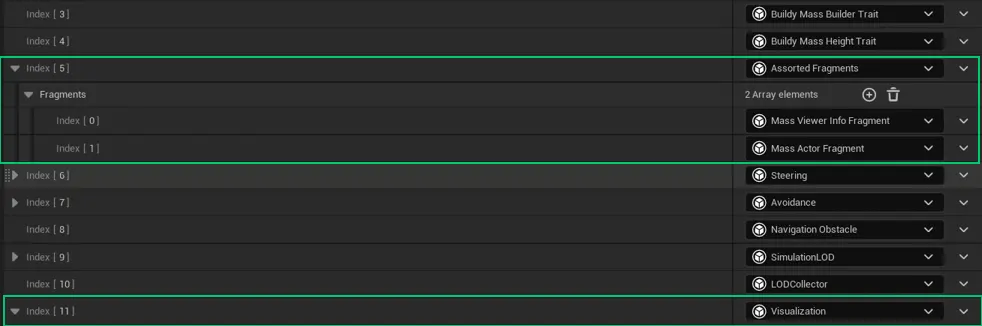
In this case, we're adding the Mass Viewer Info Fragment and the Mass Actor Fragment in case we want to have actors visualized.
Visualization Trait / Crowd Visualization Trait
A Trait extending default Visualization Trait.

UCLASS(BlueprintType, EditInlineNew, CollapseCategories, meta=(DisplayName="Crowd Visualization"))
class MASSCROWD_API UMassCrowdVisualizationTrait : public UMassVisualizationTrait
{
	GENERATED_BODY()
public:
	UMassCrowdVisualizationTrait();

	virtual void BuildTemplate(FMassEntityTemplateBuildContext& BuildContext, const UWorld& World) const override;
};UMassCrowdVisualizationTrait::UMassCrowdVisualizationTrait()
{
// Override the subsystem to support parallelization of the crowd
RepresentationSubsystemClass = UMassCrowdRepresentationSubsystem::StaticClass();
Params.RepresentationActorManagementClass = UMassCrowdRepresentationActorManagement::StaticClass();
Params.LODRepresentation[EMassLOD::High] = EMassRepresentationType::HighResSpawnedActor;
Params.LODRepresentation[EMassLOD::Medium] = EMassRepresentationType::LowResSpawnedActor;
Params.LODRepresentation[EMassLOD::Low] = EMassRepresentationType::StaticMeshInstance;
Params.LODRepresentation[EMassLOD::Off] = EMassRepresentationType::None;
// Set bKeepLowResActor to true as a spawning optimization, this will keep the low-res actor if available while showing the static mesh instance
Params.bKeepLowResActors = true;
Params.bKeepActorExtraFrame = true;
Params.bSpreadFirstVisualizationUpdate = false;
Params.WorldPartitionGridNameContainingCollision = NAME_None;
Params.NotVisibleUpdateRate = 0.5f;
LODParams.BaseLODDistance[EMassLOD::High] = 0.f;
LODParams.BaseLODDistance[EMassLOD::Medium] = 500.f;
LODParams.BaseLODDistance[EMassLOD::Low] = 1000.f;
LODParams.BaseLODDistance[EMassLOD::Off] = 5000.f;
LODParams.VisibleLODDistance[EMassLOD::High] = 0.f;
LODParams.VisibleLODDistance[EMassLOD::Medium] = 1000.f;
LODParams.VisibleLODDistance[EMassLOD::Low] = 5000.f;
LODParams.VisibleLODDistance[EMassLOD::Off] = 10000.f;
LODParams.LODMaxCount[EMassLOD::High] = 10;
LODParams.LODMaxCount[EMassLOD::Medium] = 20;
LODParams.LODMaxCount[EMassLOD::Low] = 500;
LODParams.LODMaxCount[EMassLOD::Off] = TNumericLimits<int32>::Max();
LODParams.BufferHysteresisOnDistancePercentage = 20.0f;
LODParams.DistanceToFrustum = 0.0f;
LODParams.DistanceToFrustumHysteresis = 0.0f;
LODParams.FilterTag = FMassCrowdTag::StaticStruct();
}
void UMassCrowdVisualizationTrait::BuildTemplate(FMassEntityTemplateBuildContext& BuildContext,
const UWorld& World) const
{
Super::BuildTemplate(BuildContext, World);
BuildContext.RequireTag<FMassCrowdTag>();
}
Anything unclear?
Let us know!