
- Vrealmatic
- Unreal Engine Wiki
- Mass Framework
- Crowd Visualization
Crowd Visualization trait in Mass Framework
How does Crowd Visualization Trait works in Mass Framework? Mass Framework is an ECS for managing crowds and traffic, available since Unreal Engine 5.0. The code below is a project-specific example built on the UE 5.3 API - check signatures against your engine version (UE 5.8).


Crowd Visualization Trait
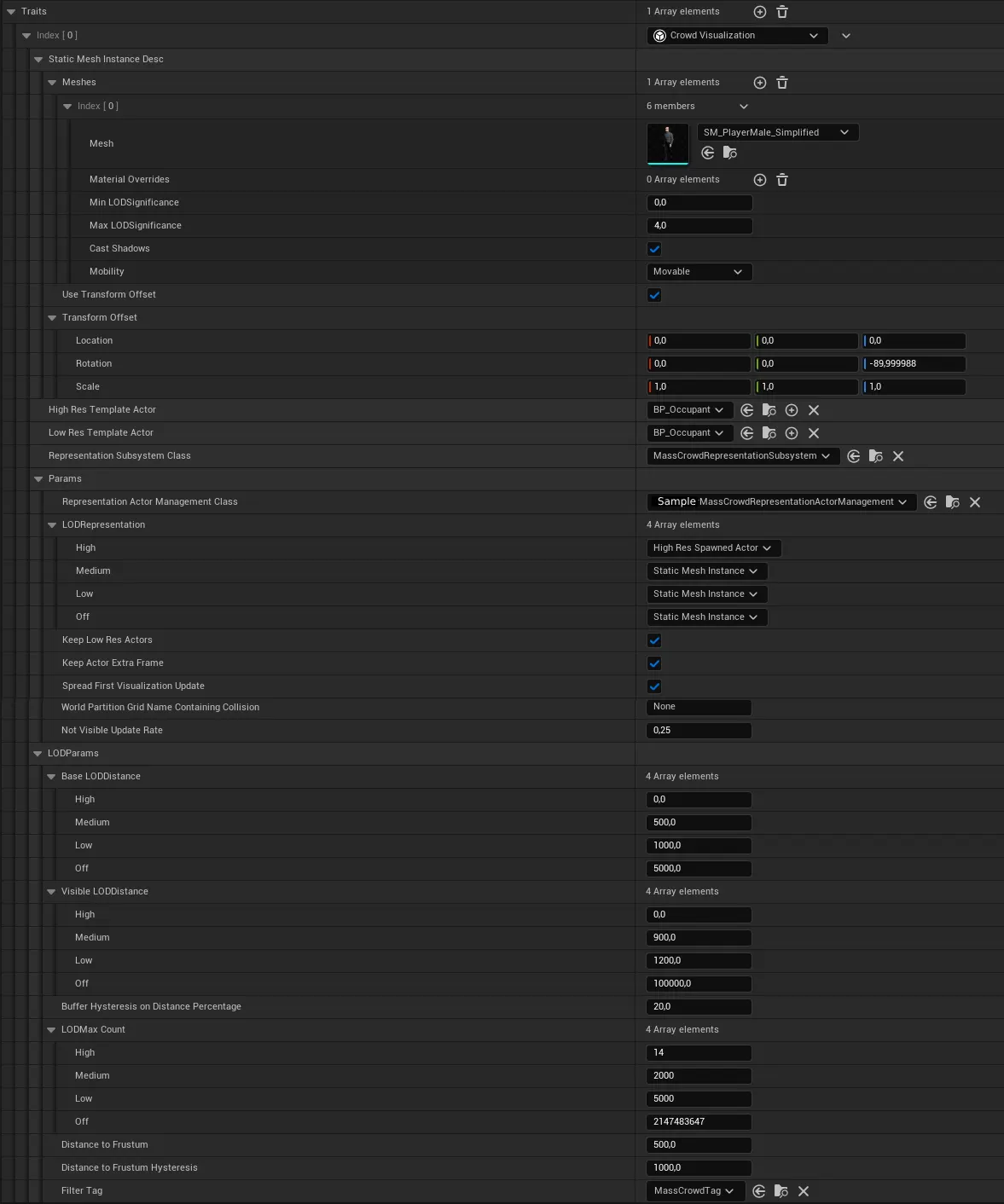
Setup:
Params
- RepresentationActorManagementClass: Class for adjusted controlling of spawned Actors, such as position adjustments.h
// Copyright Epic Games, Inc. All Rights Reserved. #pragma once #include "MassCrowdRepresentationActorManagement.h" #include "SampleMassCrowdRepresentationActorManagement.generated.h" struct FMassEntityManager; class UMassCrowdSpawnerSubsystem; /** * Overridden actor management fro forsty specific */ UCLASS(meta = (DisplayName = "Vrealmatic Crowd Visualization")) class VREALMATICSAMPLE_API USampleMassCrowdRepresentationActorManagement <strong>: public UMassCrowdRepresentationActorManagement</strong> { GENERATED_BODY() /** * Method that will be bound to a delegate used post-spawn to notify and let the requester configure the actor * @param SpawnRequestHandle the handle of the spawn request that was just spawned * @param SpawnRequest of the actor that just spawned * @param EntityManager to use to retrieve the mass agent fragments * @return The action to take on the spawn request, either keep it there or remove it. */ virtual EMassActorSpawnRequestAction OnPostActorSpawn(const FMassActorSpawnRequestHandle& SpawnRequestHandle, FConstStructView SpawnRequest , TSharedRef<FMassEntityManager> EntityManager) const override; /** * Teleports the actor at the specified transform by preserving its velocity and without collision. * The destination will be adjusted to fit an existing capsule. * @param Transform is the new actor's transform * @param Actor is the actual actor to teleport * @param CommandBuffer to queue up anything that is thread sensitive */ virtual void TeleportActor(const FTransform& Transform, AActor& Actor, FMassCommandBuffer& CommandBuffer) const override; };.cpp// Copyright Epic Games, Inc. All Rights Reserved. #include "Mass/SampleMassCrowdRepresentationActorManagement.h" #include "IMassCrowdActor.h" #include "MassEntityManager.h" #include "MassCrowdSpawnerSubsystem.h" #include "Components/CapsuleComponent.h" #include "Character/OccupantCharacter.h" #include "Enum/MovementAction.h" EMassActorSpawnRequestAction UCitySampleMassCrowdRepresentationActorManagement::OnPostActorSpawn(const FMassActorSpawnRequestHandle& SpawnRequestHandle , FConstStructView SpawnRequest, TSharedRef<FMassEntityManager> EntityManager) const { const EMassActorSpawnRequestAction Result = Super::OnPostActorSpawn(SpawnRequestHandle, SpawnRequest, EntityManager); const FMassActorSpawnRequest& MassActorSpawnRequest = SpawnRequest.Get<const FMassActorSpawnRequest>(); checkf(MassActorSpawnRequest.SpawnedActor, TEXT("Expecting valid spawned actor")); if (IMassCrowdActorInterface* MassCrowdActor = Cast<IMassCrowdActorInterface>(MassActorSpawnRequest.SpawnedActor)) { MassCrowdActor->OnGetOrSpawn(&EntityManager.Get(), MassActorSpawnRequest.MassAgent); } return Result; } void USampleMassCrowdRepresentationActorManagement::TeleportActor(const FTransform& Transform, AActor& Actor, FMassCommandBuffer& CommandBuffer) const { FTransform RootTransform = Transform; if (const UCapsuleComponent* CapsuleComp = Actor.FindComponentByClass<UCapsuleComponent>()) { const FVector HalfHeight(0.0f, 0.0f, CapsuleComp->GetScaledCapsuleHalfHeight()); RootTransform.AddToTranslation(HalfHeight); const FVector RootLocation = RootTransform.GetLocation(); const FVector SweepOffset(0.0f, 0.0f, 20.0f); const FVector Start = RootLocation + SweepOffset; const FVector End = RootLocation - SweepOffset; FCollisionQueryParams Params; Params.AddIgnoredActor(&Actor); FHitResult OutHit; if (Actor.GetWorld()->SweepSingleByChannel(OutHit, Start, End, Transform.GetRotation(), CapsuleComp->GetCollisionObjectType(), CapsuleComp->GetCollisionShape(), Params)) { if (IMassCrowdActorInterface* MassCrowdActor = Cast<IMassCrowdActorInterface>(&Actor)) { MassCrowdActor->SetAdditionalMeshOffset(RootTransform.GetLocation().Z - OutHit.Location.Z); } if (AOccupantCharacter* Character = Cast<AOccupantCharacter>(&Actor)) { // Now you can access properties and methods of AOccupantCharacter // ... } RootTransform.SetLocation(OutHit.Location); } } // Skip Super(UMassCrowdRepresentationActorManagement) because we already done that work here and we needed to know the offset to send to the feet IK logic UMassRepresentationActorManagement::TeleportActor(RootTransform, Actor, CommandBuffer); }
- RepresentationActorManagementClass: Class for adjusted controlling of spawned Actors, such as position adjustments
LODParams
LODMax Count
- High: Maximum number of displayed entities with
LODRepresentation::High
- High: Maximum number of displayed entities with
Overriding default value
You may need to set Visualization trait values based on user preference, e.g. from the settings page. This can be done by overriding default values, see steps below:
- Creat a new derivated class of
UMassCrowdVisualizationTraittrait and use it in the project instead of the default trait - Use an
overrideof theBuildTemplate
.h#pragma once #include "CoreMinimal.h" #include "MassCrowdVisualizationTrait.h" #include "OccupantsVisualizationTrait.generated.h" /** * */ UCLASS() class PATHFINDERIMPORTER_API UOccupantsVisualizationTrait : public UMassCrowdVisualizationTrait { GENERATED_BODY() public: UFUNCTION(BlueprintCallable, Category = "Visualization") void SetLODMaxCountFromSession(); virtual void BuildTemplate(FMassEntityTemplateBuildContext& BuildContext, const UWorld& World) const override;};.cpp#include "Mass/Traits/OccupantsVisualizationTrait.h" #include "MassEntityTemplateRegistry.h" #include "Data/PermanentData.h" void UOccupantsVisualizationTrait::SetLODMaxCountFromSession() { UPermanentData* SaveGameInstance = NewObject<UPermanentData>(); if (SaveGameInstance) { int32 HlodOccupantsCount = SaveGameInstance->GetLodMaxCountHigh(); LODParams.LODMaxCount[EMassLOD::High] = HlodOccupantsCount; UE_LOG(LogTemp, Display, TEXT("[UOccupantsVisualizationTrait] SET HLOD occupants count param to %d"), HlodOccupantsCount); } else { UE_LOG(LogTemp, Warning, TEXT("[UOccupantsVisualizationTrait] Failed to load SaveGame data, using default value.")); } } void UOccupantsVisualizationTrait::BuildTemplate(FMassEntityTemplateBuildContext& BuildContext, const UWorld& World) const { UOccupantsVisualizationTrait* MutableThis = const_cast<UOccupantsVisualizationTrait*>(this); MutableThis->SetLODMaxCountFromSession(); Super::BuildTemplate(BuildContext, World);}- Creat a new derivated class of
Anything unclear?
Let us know!