
Processing of Crowds is City Sample project
The structure analysis of Crowds in City Sample project. Before studying the principles below, be sure you understand the Mass Framework concept. The code comes from the original City Sample (UE 5.0–5.3) - the Mass API changed since then, see the overview of changes up to UE 5.8.


Sample Video
Crowds in CitySample project are MetaHuman based characters. They are managed through assembled individual parts into a body. This allows to achieve a high variability in the number of individually looking characters when using a limited number of assets.
Crowds in CitySample project are controlled through the MassFramework, especially through ZoneGraph navigation in its MassAI plugin.
Crowd Assets
CitySample project comes with assets at Crowds folder that contain following:
- Character folder with:
- Female and Male folder. Each is with:
- 6 heads with differ faces and then
Static Meshfor head (and mustache for male) in 4 LODs. Faces are for various nationalities. - 3 Body types based on weight:
Normal,Over,Under. Each containRigandSkeletal meshesfor various outfit parts.
- 6 heads with differ faces and then
- Accessories folder with
Static Meshesfor human accessories, namely:- 3 briefcases
- 3 purses
- 1 Smartphone
- 1 Coffee cap
- 2 backpacks in various variants
- Shared folder with shared Rig, Materials and other data and settings
- Anims folder with animations
- AnimSets folder with Data Asset files for animating Accessories from Accessories folder
- Female and Male folder. Each is with:
- VAT folder with:
- 164 Static Meshes with baked animation based on animation sequence (see data folder):
- 9 Hair meshes in LOD 5
- Woman-based meshes:
- 18 head faces
- 1 full body (1 Color Nat combined) for the worst LOD
- 1 nrw + 1 ovw + 1 unw body (hands)
- 27 top parts
- 15 bottom parts
- 9 pairs of shoes
- Man-based meshes:
- 18 head faces
- 1 full body (1 Color Nat combined) for the worst LOD
- 1nrw + 1 ovw + 1 unw body (hands)
- 36 top parts
- 18 bottom parts
- 6 pairs of shoes
- 155 Data Asssets files (
AnimToTexturetype) for animated static mashesThe purpose of each such file is to link
Skeletal MeshwithStatic Mesh,Animation Sequencefile and other related data, see more at AnimToTexture plugin.CitySample uses
Static MesheswithBone animations. See example of one of the file (DA_f_tal_nrw_scoopneck_croppedJacket) below: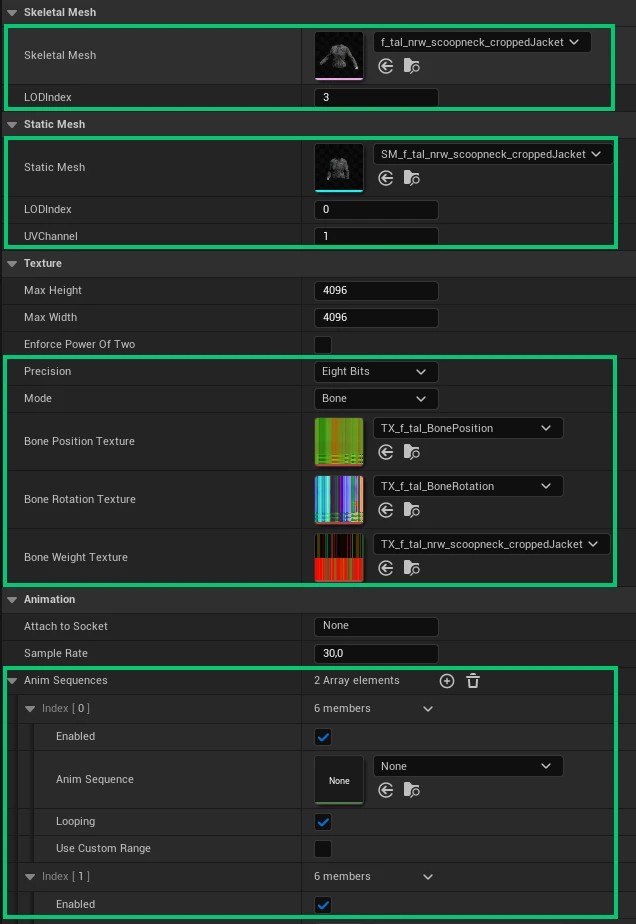
Notice, that:
- Precision of
Eight Bits,Bonemode and texture files (Bone Position Texture,Bone Rotation Texture,Bone Weight Texture) of all 155 Data Asset files refer to the same texture files located atCrowd/Vat. - Empty
Anim Sequenceson the screenshot above are correct in this phase and applay for all the 155 Data Asset configuration files.
- Precision of
Assets list
ImageThere's an asset list that refer to the all the assets mentioned above - it's named
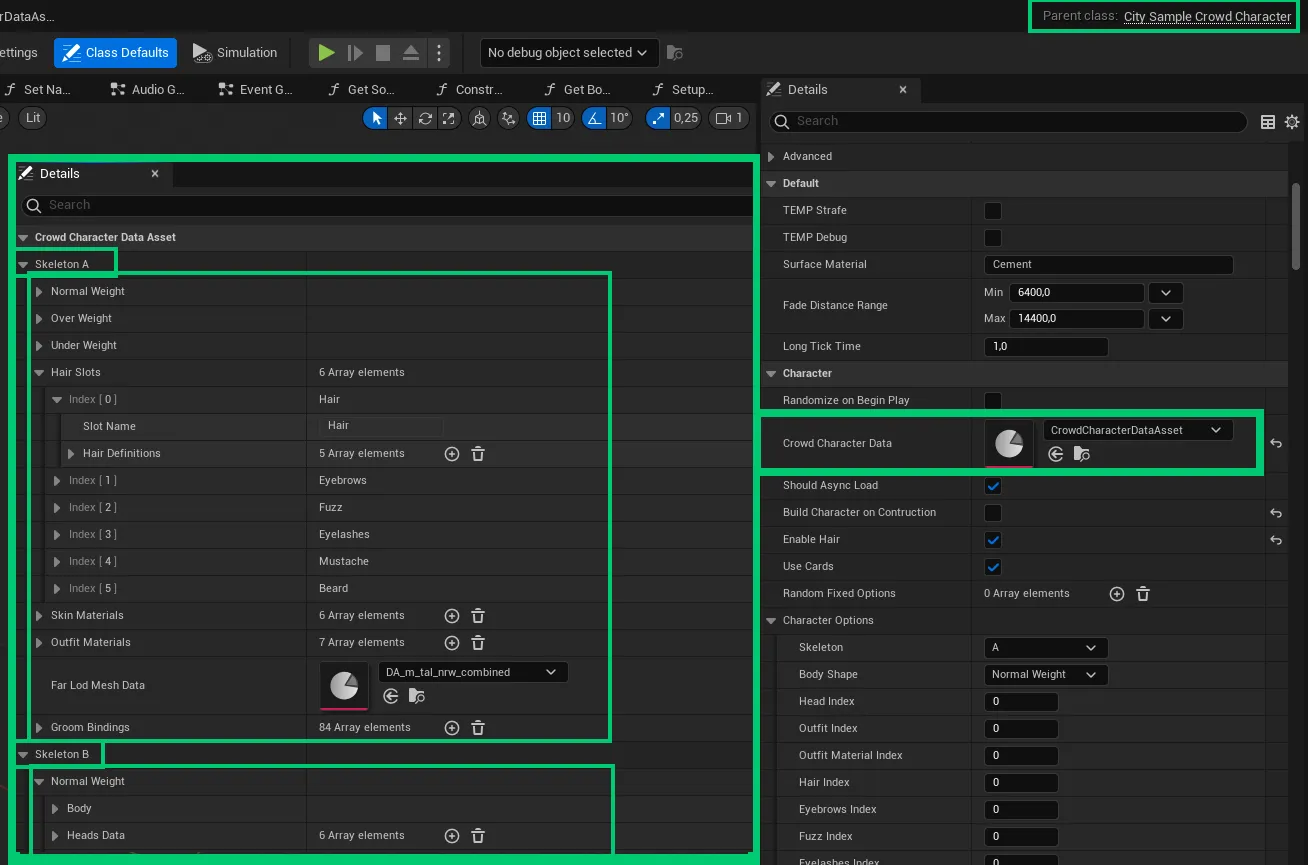
CrowdCharacterDataAssetDataAsset file with location atCrowd/Character/Shared/Data. This file is then used as a list of available assets we can work for indicidual characters - specifically for building them.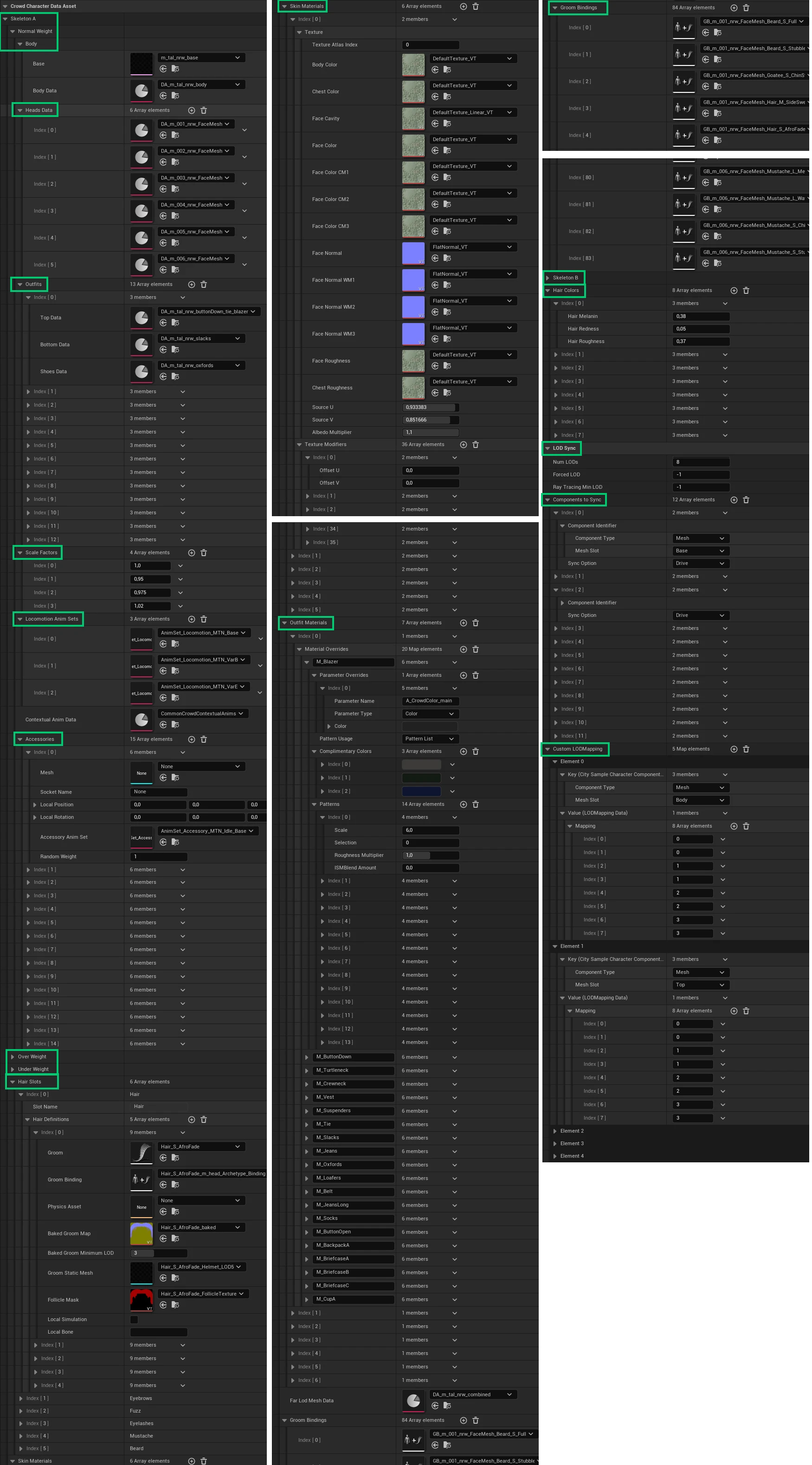
Click at the image to open it in full size .hUCLASS(Blueprintable, BlueprintType) class CITYSAMPLE_API UCrowdCharacterDataAsset : public UPrimaryDataAsset { GENERATED_BODY() public: virtual void PostLoad() { Super::PostLoad(); }; /* Male BodyTypes, Outift & Hair Definition */ UPROPERTY(EditAnywhere, BlueprintReadOnly, meta = (AssetBundles = "Client")) FCrowdGenderDefinition SkeletonA; /* Female BodyTypes, Outift & Hair Definition */ UPROPERTY(EditAnywhere, BlueprintReadOnly, meta = (AssetBundles = "Client")) FCrowdGenderDefinition SkeletonB; /* Array of Hair Color Definitions */ UPROPERTY(EditAnywhere, BlueprintReadOnly) TArray<FCrowdHairColorDefinition> HairColors; //-- LOD Related settings. Mirrors LOD Sync component settings and then passes them through in SetupLODSync // if -1, it's default and it will calculate the max number of LODs from all sub components // if not, it is a number of LODs (not the max index of LODs) UPROPERTY(EditAnywhere, BlueprintReadWrite, Category = "LOD Sync") int32 NumLODs = 8; // if -1, it's automatically switching UPROPERTY(EditAnywhere, BlueprintReadWrite, Category = "LOD Sync") int32 ForcedLOD = -1; // Optionnally override the min. ray tracing LOD set on the skeleton mesh. Default: -1, use the skeleton mesh value UPROPERTY(EditAnywhere, BlueprintReadOnly, Category = "LOD Sync") int32 RayTracingMinLOD = -1; /** * Array of components whose LOD may drive or be driven by this component. * Components that are flagged as 'Drive' are treated as being in priority order, with the last component having highest priority. The highest priority * visible component will set the LOD for all other components. If no components are visible, then the highest priority non-visible component will set LOD. */ UPROPERTY(EditAnywhere, BlueprintReadWrite, Category = "LOD Sync") TArray<FCitySampleComponentSync> ComponentsToSync; // by default, the mapping will be one to one // but if you want custom, add here. UPROPERTY(EditAnywhere, BlueprintReadWrite, Category = "LOD Sync") TMap<FCitySampleCharacterComponentIdentifier, FLODMappingData> CustomLODMapping; //-- End LOD settings /* Array of Outfit Color Definitions */ //UPROPERTY(EditAnywhere, BlueprintReadOnly) //TArray<FCrowdOutfitColorDefinition> OutfitColors; /* Returns Character Definition from given indices */ UFUNCTION(BlueprintCallable) FCrowdCharacterDefinition GetCharacterDefinition( const ECitySampleCrowdGender Skeleton, const ECitySampleCrowdBodyType BodyType, const int32 HeadIndex, const int32 OutfitIndex, const int32 OutfitMaterialIndex, const int32 HairIndex, const int32 HairColorIndex, const int32 AccessoryIndex, const int32 SkinTextureIndex, const int32 SkinTextureModifierIndex, const int32 ScaleFactorIndex) const; /* Returns Definition Indices from a Global Index */ UFUNCTION(BlueprintCallable) FCrowdCharacterDefinition GetCharacterDefinitionFromIndex(const int32 GlobalIndex) const; /* Finds All Unique Outfit DataAsset used in all OutfitDefinitions */ UFUNCTION(BlueprintCallable) TArray< UAnimToTextureDataAsset*> FindOutfitDataAssets(const bool bMale=true, const bool bFemale=true) const; /* Finds All Unique Body DataAsset used in all BodyDefinitions */ UFUNCTION(BlueprintCallable) TArray< UAnimToTextureDataAsset*> FindBodyDataAssets(const bool bMale = true, const bool bFemale = true) const; /* Finds All Unique Head DataAsset used in all Definitions */ UFUNCTION(BlueprintCallable) TArray< UAnimToTextureDataAsset*> FindHeadDataAssets(const bool bMale = true, const bool bFemale = true) const; /* Finds Unique (Outfit/Body/Head) DataAsset used in all Definitions. */ UFUNCTION(BlueprintCallable) TArray< UAnimToTextureDataAsset*> FindDataAssets(const bool bMale = true, const bool bFemale = true) const; /* Finds All Unique Outfit SkeletalMeshes used in all OutfitDefinitions */ UFUNCTION(BlueprintCallable) TArray< USkeletalMesh*> FindOutfitSkeletalMeshes(const bool bMale = true, const bool bFemale = true) const; /* Finds All Unique Base SkeletalMeshes used in all BodyDefinitions */ UFUNCTION(BlueprintCallable) TArray< USkeletalMesh*> FindBaseSkeletalMeshes(const bool bMale = true, const bool bFemale = true) const; /* Finds All Unique Body SkeletalMeshes used in all BodyDefinitions */ UFUNCTION(BlueprintCallable) TArray< USkeletalMesh*> FindBodySkeletalMeshes(const bool bMale = true, const bool bFemale = true) const; /* Finds All Unique Head SkeletalMeshes used in all Definitions */ UFUNCTION(BlueprintCallable) TArray< USkeletalMesh*> FindHeadSkeletalMeshes(const bool bMale = true, const bool bFemale = true) const; /* Finds Unique (Outfit/Body/Head) SkeletalMeshes used in all Definitions. */ UFUNCTION(BlueprintCallable) TArray< USkeletalMesh*> FindSkeletalMeshes(const bool bMale = true, const bool bFemale = true) const; /* Finds All Unique Grooms used in all Definitions */ UFUNCTION(BlueprintCallable) TArray< UGroomAsset* > FindGrooms(const bool bMale = true, const bool bFemale = true, const bool bHair = true, const bool bEyebrows = true, const bool bFuzz = true, const bool bEyelashes = true, const bool bMustache = true, const bool bBeard = true) const; /* Finds All Unique Groom Meshes used in all Definitions. * If GroupIndex is INDEX_NONE all LOD meshes will be returned. */ UFUNCTION(BlueprintCallable) TArray< UStaticMesh* > FindGroomMeshes(const bool bMale = true, const bool bFemale = true, const bool bHair = true, const bool bEyebrows = true, const bool bFuzz = true, const bool bEyelashes = true, const bool bMustache = true, const bool bBeard = true, const int32 GroupIndex = -1 /*INDEX_NONE*/) const; /* Finds All Unique Accessory Meshes used in all Definitions.*/ UFUNCTION(BlueprintCallable) TArray< UStaticMesh* > FindAccesoryMeshes(const bool bMale = true, const bool bFemale = true) const; };Notice, that:
- The DataAsset file contain list of all assets binded to certain skeleton type (A/B + Weight)
- There's displayed only assets for
Skeleton AofNormal Weight. Skeleton B and other Weights have the same options. - The DataAsset file contain shared assets for LODs, differention, binding etc.
- 164 Static Meshes with baked animation based on animation sequence (see data folder):
- Blueprints folder with:
- BP_Crowd_Character Blueprint class used for Crowd Characters. The class has a reference to Assets List based on which its visual is created.
- BPI_CrowdCharacter Blueprint Interface
- VFXWarpState Enumeration file with 4 defined states
Two Types of Humans
CitySample project works with 2 techniques ("types") of humans that are switched each other based on the distance (LODs) from the player's camera. As both types share metadata (visual, transform and so on) they keep the same look that only differ in details while switching between them.
Crowd Characters
CitySample project uses
Charactersfor the nearest humans to the player camera. These characters have an extra details as well as functionality, such as holding an extra accessory, see below: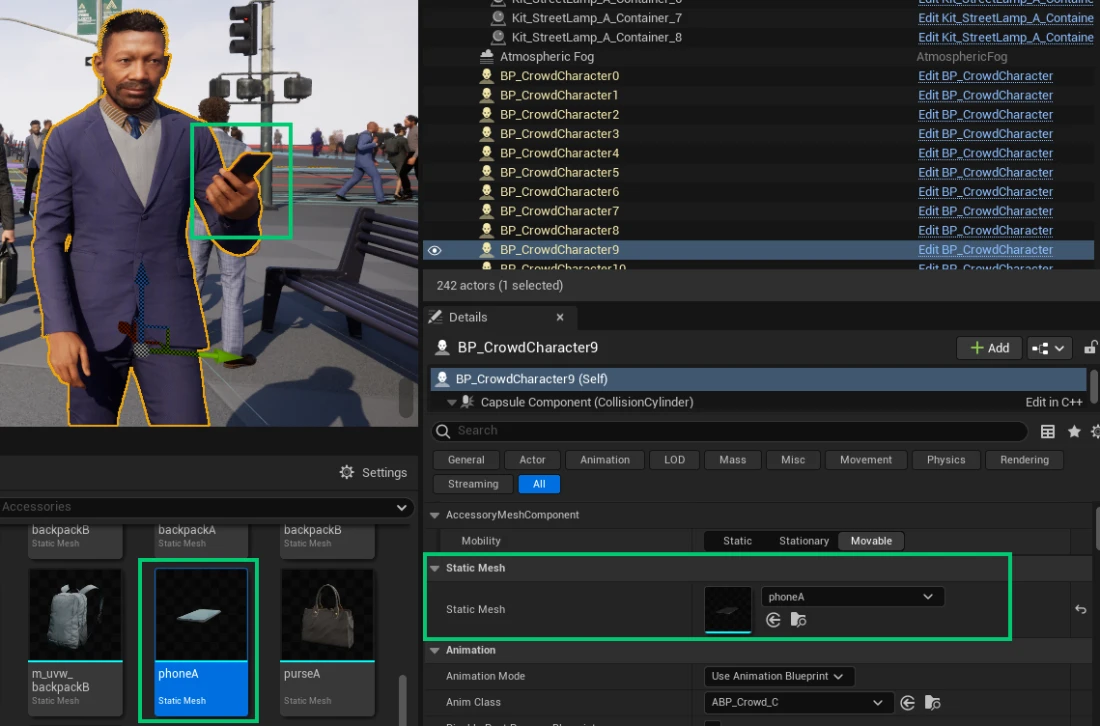
Character Class Inheritance
- ACharacter
- ACitySampleCharacter
- ACitySampleCrowdCharacter
- BP_CrowdCharacter
- ACitySampleCrowdCharacter
- ACitySampleCharacter
Characters use
Skeletal Meshesand as for the animations, they useAnimation BlueprintAnimation Mode and rely onABP_Crowd_Cfile located atCharacter/Anims.- ACharacter
Crowd Members
Crowd members are represented with static meshes with baked bone animations. There's no actor representation of each in the world, instead, they are instanced, displayed through the Mass Subsystem.
Building characters
In the CitySample, there are not created characters that would be just placed into the scene, instead, every character is dynamically assembled from crowd parts in the application start time.
Character's visual definition - parts the character is being assembled from:
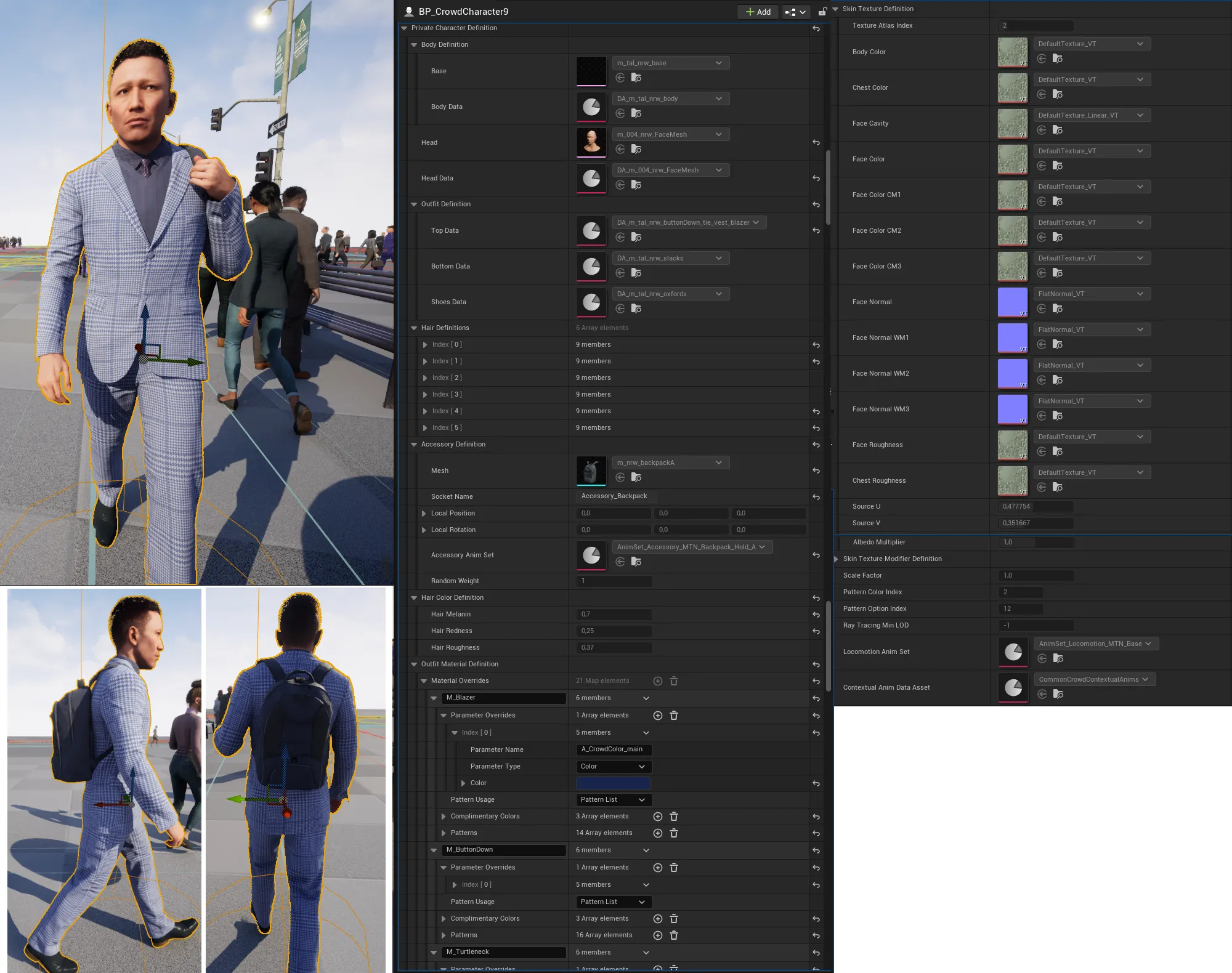
Character's visual (and individual parts) choosed from the Assets List (UCrowdCharacterDataAsset class) is holded in FCrowdCharacterDefinition struct that contain other substructs, see below:
USTRUCT(BlueprintType)
struct CITYSAMPLE_API FCrowdCharacterDefinition
{
GENERATED_BODY()
FCrowdCharacterDefinition()
{
HairDefinitions.SetNum(static_cast<uint8>(ECrowdHairSlots::MAX));
}
const FCrowdHairDefinition& GetHairDefinitionForSlot(const ECrowdHairSlots HairSlot) const
{
uint8 SlotIdx = static_cast<uint8>(HairSlot);
// Should always succeed as the array is sized to the enum
check(HairDefinitions.IsValidIndex(SlotIdx));
return HairDefinitions[SlotIdx];
}
// Meshes
UPROPERTY(EditAnywhere, BlueprintReadOnly)
FCrowd<mark>BodyDefinition BodyDefinition;</mark>
UPROPERTY(EditAnywhere, BlueprintReadOnly)
TSoftObjectPtr<mark><USkeletalMesh> Head;</mark>
UPROPERTY(EditAnywhere, BlueprintReadOnly)
TSoftObjectPtr<UAnimToTextureDataAsset> HeadData;
UPROPERTY(EditAnywhere, BlueprintReadOnly)
FCrowd<mark>OutfitDefinition OutfitDefinition;</mark>
// Fixed size array where the index in the array corresponds to a value in ECrowdHairSlots
// i.e. HairDefinitions[0] is the hair definition for ECrowdHairSlots::Hair and so on
UPROPERTY(EditAnywhere, BlueprintReadOnly, EditFixedSize)
TArray<mark><FCrowdHairDefinition> HairDefinitions;</mark>
UPROPERTY(EditAnywhere, BlueprintReadOnly)
FCrowd<mark>AccessoryDefinition AccessoryDefinition;</mark>
// Material & Textures
UPROPERTY(EditAnywhere, BlueprintReadOnly)
FCrowd<mark>HairColorDefinition HairColorDefinition;</mark>
UPROPERTY(EditAnywhere, BlueprintReadOnly)
FCrowd<mark>OutfitMaterialDefinition OutfitMaterialDefinition;</mark>
UPROPERTY(EditAnywhere, BlueprintReadOnly)
FCrowd<mark>SkinTextureDefinition SkinTextureDefinition;</mark>
UPROPERTY(EditAnywhere, BlueprintReadOnly)
FCrowd<mark>SkinTextureModifierDefinition SkinTextureModifierDefinition;</mark>
UPROPERTY(EditAnywhere, BlueprintReadOnly)
float <mark>ScaleFactor = 1.0f;</mark>
UPROPERTY(EditAnywhere, BlueprintReadOnly)
uint8 <mark>PatternColorIndex = 0;</mark>
UPROPERTY(EditAnywhere, BlueprintReadOnly)
uint8 <mark>PatternOptionIndex = 0;</mark>
// Optionnally override the min. ray tracing LOD set on the skeleton mesh. Default: -1, use the skeleton mesh value
UPROPERTY(EditAnywhere, BlueprintReadOnly)
int32 <mark>RayTracingMinLOD = -1;</mark>
UPROPERTY(EditAnywhere, BlueprintReadOnly)
TSoftObjectPtr<mark><UDataAsset> LocomotionAnimSet;</mark>
UPROPERTY(EditAnywhere, BlueprintReadOnly)
TSoftObjectPtr<mark><UMassCrowdContextualAnimationDataAsset> ContextualAnimDataAsset;</mark>
TArray<FSoftObjectPath> GetSoftPathsToLoad() const;
};
Character Meshes
USTRUCT(BlueprintType)
struct CITYSAMPLE_API FCrowd<mark>BodyDefinition</mark>
{
GENERATED_BODY()
UPROPERTY(EditAnywhere, BlueprintReadOnly)
TSoftObjectPtr<USkeletalMesh> Base;
UPROPERTY(EditAnywhere, BlueprintReadOnly)
TSoftObjectPtr<UAnimToTextureDataAsset> BodyData;
//UPROPERTY(EditAnywhere, BlueprintReadOnly)
//TSoftObjectPtr<USkeletalMesh> Head;
};USTRUCT(BlueprintType)
struct CITYSAMPLE_API FCrowd<mark>OutfitDefinition</mark>
{
GENERATED_BODY()
UPROPERTY(EditAnywhere, BlueprintReadOnly)
TSoftObjectPtr<UAnimToTextureDataAsset> <strong>TopData;</strong>
UPROPERTY(EditAnywhere, BlueprintReadOnly)
TSoftObjectPtr<UAnimToTextureDataAsset> <strong>BottomData;</strong>
UPROPERTY(EditAnywhere, BlueprintReadOnly)
TSoftObjectPtr<UAnimToTextureDataAsset> <strong>ShoesData;</strong>
};USTRUCT(BlueprintType)
struct CITYSAMPLE_API FCrowd<mark>HairDefinition</mark>
{
GENERATED_BODY()
FCrowdHairDefinition() = default;
FCrowdHairDefinition(TSoftObjectPtr<UGroomAsset> InGroom, TSoftObjectPtr<UGroomBindingAsset> InGroomBinding)
: Groom(InGroom)
, GroomBinding(InGroomBinding)
{
};
UPROPERTY(EditAnywhere, BlueprintReadOnly)
TSoftObjectPtr<UGroomAsset> Groom;
UPROPERTY(EditAnywhere, BlueprintReadOnly)
TSoftObjectPtr<UGroomBindingAsset> GroomBinding;
UPROPERTY(EditAnywhere, BlueprintReadOnly)
TSoftObjectPtr<UPhysicsAsset> PhysicsAsset;
UPROPERTY(EditAnywhere, BlueprintReadOnly)
TSoftObjectPtr<UTexture2D> BakedGroomMap;
UPROPERTY(EditAnywhere, BlueprintReadOnly, meta = (ClampMin = "0", ClampMax = "7", UIMin = "0", UIMax = "7"))
int BakedGroomMinimumLOD = 2;
UPROPERTY(EditAnywhere, BlueprintReadOnly, meta = (AssetBundles = "Client"))
TSoftObjectPtr<UStaticMesh> GroomStaticMesh;
UPROPERTY(EditAnywhere, BlueprintReadOnly, meta = (AssetBundles = "Client"))
TSoftObjectPtr<UTexture2D> FollicleMask;
UPROPERTY(EditAnywhere, BlueprintReadOnly)
bool bLocalSimulation = false;
UPROPERTY(EditAnywhere, BlueprintReadOnly)
FString LocalBone;
void UpdateGroomBinding(const FSoftObjectPath& PathToHeadMesh, const ECitySampleCrowdGender Skeleton);
UStaticMesh* GetGroomStaticMesh() const
{
UStaticMesh* ReturnVal = nullptr;
if (GroomStaticMesh.ToSoftObjectPath().IsValid())
{
ReturnVal = GroomStaticMesh.Get();
if (!ReturnVal)
{
UStaticMesh* LoadedAsset = Cast<UStaticMesh>(GroomStaticMesh.ToSoftObjectPath().TryLoad());
if (ensureMsgf(LoadedAsset, TEXT("Failed to load asset pointer %s"), *GroomStaticMesh.ToString()))
{
ReturnVal = LoadedAsset;
}
}
}
return ReturnVal;
}
};USTRUCT(BlueprintType)
struct CITYSAMPLE_API FCrowd<mark>AccessoryDefinition</mark>
{
GENERATED_BODY()
UPROPERTY(EditAnywhere, BlueprintReadOnly, meta = (AssetBundles = "Client"))
TSoftObjectPtr<UStaticMesh> Mesh;
UPROPERTY(EditAnywhere, BlueprintReadOnly)
FName SocketName;
UPROPERTY(EditAnywhere, BlueprintReadOnly)
FVector LocalPosition = FVector::ZeroVector;
/** #fixme jf: I assume this should be an FRotator and other code fixed up to deal? Current usage of this treats it like a forward vector instead of a rotation, which is maybe ok? */
UPROPERTY(EditAnywhere, BlueprintReadOnly)
FVector LocalRotation = FVector::ZeroVector;
UPROPERTY(EditAnywhere, BlueprintReadOnly, meta = (AssetBundles = "Client"))
TSoftObjectPtr<UDataAsset> AccessoryAnimSet;
// Assigns a weight to the accessory for use in randomization
// Weights less than 0 will be treated as if they were 0.
UPROPERTY(EditAnywhere, BlueprintReadOnly)
int32 RandomWeight = 1;
};Character Materials & Textures
USTRUCT(BlueprintType)
struct CITYSAMPLE_API FCrowd<mark>HairColorDefinition</mark>
{
	GENERATED_BODY()

	UPROPERTY(EditAnywhere, BlueprintReadOnly)
	float HairMelanin = 0.161905f;

	UPROPERTY(EditAnywhere, BlueprintReadOnly)
	float HairRedness = 0.25f;

	UPROPERTY(EditAnywhere, BlueprintReadOnly)
	float HairRoughness = 0.37f;
};USTRUCT(BlueprintType)
struct CITYSAMPLE_API FCrowd<mark>OutfitMaterialDefinition</mark>
{
GENERATED_BODY()
UPROPERTY(EditAnywhere, BlueprintReadOnly)
TMap<FName, <strong>FCrowdMaterialOverride</strong>> MaterialOverrides;
void ApplyToComponent(UMeshComponent* MeshComponent, const uint8 PatternColorIndex, const uint8 PatternOptionIndex) const;
bool GetPatternInfoForSlot(const FName SlotName, const uint8 PatternColorIndex, const uint8 PatternSelectionIndex, FColor& PatternColor, FCrowdPatternInfo& PatternInfo) const;
int32 GetMaxPatternColors() const;
int32 GetMaxPatternOptions() const;
};USTRUCT(BlueprintType)
struct CITYSAMPLE_API FCrowd<mark>SkinTextureDefinition</mark>
{
GENERATED_BODY()
UPROPERTY(EditAnywhere, BlueprintReadOnly, meta = (ClampMin = "0", ClampMax = "15", UIMin = "0", UIMax = "15"))
int TextureAtlasIndex = 0;
UPROPERTY(EditAnywhere, BlueprintReadOnly)
TSoftObjectPtr<UTexture2D> BodyColor;
UPROPERTY(EditAnywhere, BlueprintReadOnly)
TSoftObjectPtr<UTexture2D> ChestColor;
UPROPERTY(EditAnywhere, BlueprintReadOnly)
TSoftObjectPtr<UTexture2D> FaceCavity;
UPROPERTY(EditAnywhere, BlueprintReadOnly)
TSoftObjectPtr<UTexture2D> FaceColor;
UPROPERTY(EditAnywhere, BlueprintReadOnly)
TSoftObjectPtr<UTexture2D> FaceColorCM1;
UPROPERTY(EditAnywhere, BlueprintReadOnly)
TSoftObjectPtr<UTexture2D> FaceColorCM2;
UPROPERTY(EditAnywhere, BlueprintReadOnly)
TSoftObjectPtr<UTexture2D> FaceColorCM3;
UPROPERTY(EditAnywhere, BlueprintReadOnly)
TSoftObjectPtr<UTexture2D> FaceNormal;
UPROPERTY(EditAnywhere, BlueprintReadOnly)
TSoftObjectPtr<UTexture2D> FaceNormalWM1;
UPROPERTY(EditAnywhere, BlueprintReadOnly)
TSoftObjectPtr<UTexture2D> FaceNormalWM2;
UPROPERTY(EditAnywhere, BlueprintReadOnly)
TSoftObjectPtr<UTexture2D> FaceNormalWM3;
UPROPERTY(EditAnywhere, BlueprintReadOnly)
TSoftObjectPtr<UTexture2D> FaceRoughness;
UPROPERTY(EditAnywhere, BlueprintReadOnly)
TSoftObjectPtr<UTexture2D> ChestRoughness;
UPROPERTY(EditAnywhere, BlueprintReadOnly, meta = (ClampMin = "0.0", ClampMax = "1.0", UIMin = "0.0", UIMax = "1.0"))
float SourceU = 0.5f;
UPROPERTY(EditAnywhere, BlueprintReadOnly, meta = (ClampMin = "0.0", ClampMax = "1.0", UIMin = "0.0", UIMax = "1.0"))
float SourceV = 0.5f;
UPROPERTY(EditAnywhere, BlueprintReadOnly, meta = (ClampMin = "0.9", ClampMax = "1.1", UIMin = "0.9", UIMax = "1.1"))
float AlbedoMultiplier = 1.f;
};USTRUCT(BlueprintType)
struct CITYSAMPLE_API FCrowd<mark>SkinTextureModifierDefinition</mark>
{
GENERATED_BODY()
UPROPERTY(EditAnywhere, BlueprintReadOnly, meta = (ClampMin = "0.0", ClampMax = "1.0", UIMin = "0.0", UIMax = "1.0"))
float OffsetU = 0.5f; // MelaninRandomSeed
UPROPERTY(EditAnywhere, BlueprintReadOnly, meta = (ClampMin = "0.0", ClampMax = "1.0", UIMin = "0.0", UIMax = "1.0"))
float OffsetV = 0.5f; // RednessRandomSeed
};The FCrowdCharacterDefinition structure is created for each crowd member (including character) and defines its visual. See the process of filling the Struct with data in Building Characters section.
Filing FCrowdCharacterDefinition with data from UCrowdCharacterDataAsset
To summarize the important, we have 2 following structs that we use for characters creation:
UCrowdCharacterDataAssetthat keeps a list of all available assets we can use for the crowdsFCrowdCharacterDefinitionstruct that is attached to each member and contain used parts (and other data) for the member fromUCrowdCharacterDataAssetIt's used also when shitching between Crowd member (Bone Animated Static Mesh) and Crowd Character member (detailed skeleton with animations) to keep the same look.
Both UCrowdCharacterDataAsset and FCrowdCharacterDefinition are attached to ACitySampleCrowdCharacter class that represents our BP_CrowdCharacter located at Crowd/Blueprints and representing Crowd Character Members (nearest members to player's camera). See the code and image below:
UCLASS(DefaultToInstanced)
class CITYSAMPLE_API ACitySampleCrowdCharacter : public /*ACharacter*/ACitySampleCharacter, public IMassCrowdActorInterface, public IMassActorPoolableInterface
{
GENERATED_BODY()
...
public:
UPROPERTY(EditAnywhere, BlueprintReadWrite, Category="Character", Interp)
<mark>TObjectPtr<UCrowdCharacterDataAsset></mark> CrowdCharacterData;
...
private:
UPROPERTY()
<mark>FCrowdCharacterDefinition</mark> PrivateCharacterDefinition;
...
}Then, we have 2 Custom MassProcessors in the project:
UCitySampleCrowdVisualizationFragmentInitializer- takes care about fillingFCrowdCharacterDefinitionwith data fromUCrowdCharacterDataAssetand displaying nearest CharactersUMassProcessor_CrowdVisualizationCustomData- takes care aboutMassEntities(Instanced Static Meshes) visualization (Crowd in larger distance)
UCitySampleCrowdVisualizationFragmentInitializer Mass Observer Processor
As Crowd members (Mass Entities) and Mass Crowd Characters (Mass Driven Actors) both are controlled and processed through Mass Framework, FCrowdCharacterDefinition is defined and filled with data for both Crowd types right in this processor, using following logic of filling the Struct with data from Data Asset:
- Access
ACitySampleCrowdCharacterclass and get its referredCrowdCharacterDataAsset(Assets list) - Randomize the
CrowdCharacterDataAsset- doing that the characters will get random combination of assets - Use randomized
CrowdCharacterDataAssetto build teh character, Fill selected parts toFCrowdCharacterDefinition
void UCitySampleCrowdVisualizationFragmentInitializer::Execute(FMassEntityManager& EntityManager, FMassExecutionContext& Context)
{
...
EntityQuery.ForEachEntityChunk(EntityManager, Context, [&, this, RepresentationSubsystem, CachedCrowdScalabilityValues, RandomStream](FMassExecutionContext& Context)
{
const TArrayView<FCitySampleCrowdVisualizationFragment> VisualizationList = Context.GetMutableFragmentView<FCitySampleCrowdVisualizationFragment>();
const TArrayView<FMassRepresentationFragment> RepresentationList = Context.GetMutableFragmentView<FMassRepresentationFragment>();
const TArrayView<FCrowdAnimationFragment> AnimationDataList = Context.GetMutableFragmentView<FCrowdAnimationFragment>();
const int32 NumEntities = Context.GetNumEntities();
for (int32 i = 0; i < NumEntities; ++i)
{
// <mark>1 - Get the data asset file with list of assets from the crowd character</mark>
ACitySampleCrowdCharacter* CitySampleCrowdCharacterCDO = nullptr;
<mark>UCrowdCharacterDataAsset* CrowdCharacterDataAsset</mark> = nullptr;
TSubclassOf<AActor> TemplateActorClass = RepresentationSubsystem->GetTemplateActorClass(RepresentationList[i].HighResTemplateActorIndex);
if (TemplateActorClass)
{
CitySampleCrowdCharacterCDO = Cast<ACitySampleCrowdCharacter>(TemplateActorClass->GetDefaultObject());
if (CitySampleCrowdCharacterCDO)
{
<mark>CrowdCharacterDataAsset = CitySampleCrowdCharacterCDO->CrowdCharacterData.Get();</mark>
}
}
...
if (CrowdCharacterDataAsset) // Based on CrowdCharacterDataAsset
{
// <mark><strong>2 - Randomize Data of CrowdCharacterDataAsset</strong></mark>
<mark>CharacterOptions.Randomize(*CrowdCharacterDataAsset, RandomStream);</mark>
ClampCharacterOptions(CharacterOptions, CachedCrowdScalabilityValues);
VisualizationList[i].VisualizationID = FCrowdVisualizationID(CharacterOptions);
}
...
if (CVarUseMetahumanISMParts.GetValueOnGameThread() == true && RepresentationSubsystem)
{
if (CrowdCharacterDataAsset)
{
// <mark>3 - GenerateCharacterDefinition (CharacterDefinition) based on FCrowdCharacterDefinition</mark>
<a href="#FCrowdCharacterDefinition">FCrowdCharacterDefinition</a> CharacterDefinition;
CharacterOptions.<a href="#GenerateCharacterDefinition">GenerateCharacterDefinition(<strong>CrowdCharacterDataAsset</strong>, CharacterDefinition);</a>
...
<mark>4 - Attach additional</mark>
// Order of the static meshes is important here
// UMassProcessor_CrowdVisualizationCustomData::UpdateCrowdCustomData assumes
<mark>// 0 - Head</mark>
if (UAnimToTextureDataAsset* ATTDA = <strong>GetAnimToTextureDataAsset(CharacterDefinition.HeadData)</strong>)
{
ensureMsgf(ATTDA->GetStaticMesh(), TEXT("%s is missing static mesh %s"), *ATTDA->GetName(), *ATTDA->StaticMesh.ToString());
StaticMeshDesc.Mesh = ATTDA->GetStaticMesh();
StaticMeshInstanceDesc.Meshes.Add(StaticMeshDesc);
}
<mark>// 1 - Body</mark>
if (UAnimToTextureDataAsset* ATTDA = <strong>GetAnimToTextureDataAsset(CharacterDefinition.BodyDefinition.BodyData)</strong>)
{
ensureMsgf(ATTDA->GetStaticMesh(), TEXT("%s is missing static mesh %s"), *ATTDA->GetName(), *ATTDA->StaticMesh.ToString());
StaticMeshDesc.Mesh = ATTDA->GetStaticMesh();
StaticMeshInstanceDesc.Meshes.Add(StaticMeshDesc);
AnimationDataList[i].AnimToTextureData = ATTDA;
}
<mark>// 2 - Top</mark>
if (UAnimToTextureDataAsset* ATTDA = <strong>GetAnimToTextureDataAsset(CharacterDefinition.OutfitDefinition.TopData)</strong>)
{
ensureMsgf(ATTDA->GetStaticMesh(), TEXT("%s is missing static mesh %s"), *ATTDA->GetName(), *ATTDA->StaticMesh.ToString());
ensureMsgf(ATTDA->GetSkeletalMesh(), TEXT("%s is missing skeletal mesh %s"), *ATTDA->GetName(), *ATTDA->SkeletalMesh.ToString());
StaticMeshDesc.Mesh = ATTDA->GetStaticMesh();
StaticMeshInstanceDesc.Meshes.Add(StaticMeshDesc);
VisualizationList[i].TopColor = FindColorOverride(CharacterDefinition, ATTDA->GetSkeletalMesh());
}
<mark>// 3 - Bottom</mark>
if (UAnimToTextureDataAsset* ATTDA = <strong>GetAnimToTextureDataAsset(CharacterDefinition.OutfitDefinition.BottomData)</strong>)
{
ensureMsgf(ATTDA->GetStaticMesh(), TEXT("%s is missing static mesh %s"), *ATTDA->GetName(), *ATTDA->StaticMesh.ToString());
ensureMsgf(ATTDA->GetSkeletalMesh(), TEXT("%s is missing skeletal mesh %s"), *ATTDA->GetName(), *ATTDA->SkeletalMesh.ToString());
StaticMeshDesc.Mesh = ATTDA->GetStaticMesh();
StaticMeshInstanceDesc.Meshes.Add(StaticMeshDesc);
VisualizationList[i].BottomColor = FindColorOverride(CharacterDefinition, ATTDA->GetSkeletalMesh());
}
<mark>// 4 - Shoes</mark>
if (UAnimToTextureDataAsset* ATTDA = <strong>GetAnimToTextureDataAsset(CharacterDefinition.OutfitDefinition.ShoesData)</strong>)
{
ensureMsgf(ATTDA->GetStaticMesh(), TEXT("%s is missing static mesh %s"), *ATTDA->GetName(), *ATTDA->StaticMesh.ToString());
ensureMsgf(ATTDA->GetSkeletalMesh(), TEXT("%s is missing skeletal mesh %s"), *ATTDA->GetName(), *ATTDA->SkeletalMesh.ToString());
StaticMeshDesc.Mesh = ATTDA->GetStaticMesh();
StaticMeshInstanceDesc.Meshes.Add(StaticMeshDesc);
VisualizationList[i].ShoesColor = FindColorOverride(CharacterDefinition, ATTDA->GetSkeletalMesh());
}
<mark>// 5 - Hair</mark>
const FCrowdHairDefinition& HairDefinition = <strong>CharacterDefinition.GetHairDefinitionForSlot(ECrowdHairSlots::Hair)</strong>;
if (UStaticMesh* HairStaticMesh = HairDefinition.GetGroomStaticMesh())
{
StaticMeshDesc.Mesh = HairStaticMesh;
StaticMeshInstanceDesc.Meshes.Add(StaticMeshDesc);
}
...
RepresentationList[i].StaticMeshDescIndex = RepresentationSubsystem->FindOrAddStaticMeshDesc(StaticMeshInstanceDesc);
}
}
...
}
});
};Randomizes default values of UCrowdCharacterDataAsset to make member's look different
void FCrowdCharacterOptions::Randomize(const UCrowdCharacterDataAsset& DataAsset,
TSet<ECrowdLineupVariation> FixedProperties, const FRandomStream& RandomStream)
{
// First generate all the options which don't rely on other options
SetOptionEnumFromRange(ECrowdLineupVariation::Skeleton, Skeleton, 0, 1, FixedProperties, RandomStream);
SetOptionEnumFromRange(ECrowdLineupVariation::BodyType, BodyType, 0, 2, FixedProperties, RandomStream);
SetOptionIndexFromArray(ECrowdLineupVariation::HairColor, HairColorIndex, DataAsset.HairColors, FixedProperties, RandomStream);
// <mark>Grab the Gender Definition</mark>
const FCrowdGenderDefinition& <mark>GenderDefinition = Skeleton == ECitySampleCrowdGender::A ? DataAsset.SkeletonA : DataAsset.SkeletonB;</mark>
// Generate all the options which rely on Gender directly
SetOptionIndexFromArray(ECrowdLineupVariation::OutfitMaterial, OutfitMaterialIndex, GenderDefinition.OutfitMaterials, FixedProperties, RandomStream);
SetOptionIndexFromArray(ECrowdLineupVariation::SkinTexture, SkinTextureIndex, GenderDefinition.SkinMaterials, FixedProperties, RandomStream);
// Hair slots can be done in a loop. The Options array should match the size of HairSlots in the GenderDefinition
TArray<uint8*> HairOptions = { &HairIndex, &EyebrowsIndex, &FuzzIndex, &EyelashesIndex, &MustacheIndex, &BeardIndex };
if (ensure(HairOptions.Num() <= <mark>GenderDefinition</mark>.HairSlots.Num()))
{
for (int HairSlotIdx = 0; HairSlotIdx < HairOptions.Num(); ++HairSlotIdx)
{
// Find the starting point in the OptionType enum and then offset it by the slot index to find the correct enum value
const int OptionIndex = static_cast<int>(ECrowdLineupVariation::Hair) + HairSlotIdx;
SetOptionIndexFromArray(ECrowdLineupVariation(OptionIndex), *HairOptions[HairSlotIdx], GenderDefinition.HairSlots[HairSlotIdx].HairDefinitions, FixedProperties, RandomStream);
}
}
// Grab the BodyOutfit Definition from Body Type
const FCrowdBodyOutfitDefinition& BodyOutfitDefinition = BodyType == ECitySampleCrowdBodyType::NormalWeight ?
GenderDefinition.NormalWeight : BodyType == ECitySampleCrowdBodyType::OverWeight ? GenderDefinition.OverWeight : GenderDefinition.UnderWeight;
// Now Generate all the options which rely on Body Type
SetOptionIndexFromArray(ECrowdLineupVariation::Head, HeadIndex, BodyOutfitDefinition.HeadsData, FixedProperties, RandomStream);
SetOptionIndexFromArray(ECrowdLineupVariation::Outfit, OutfitIndex, BodyOutfitDefinition.Outfits, FixedProperties, RandomStream);
SetOptionIndexFromArray(ECrowdLineupVariation::ScaleFactor, ScaleFactorIndex, BodyOutfitDefinition.ScaleFactors, FixedProperties, RandomStream);
AnimSetIndex = BodyOutfitDefinition.LocomotionAnimSets.Num() ? RandomStream.RandRange(0, BodyOutfitDefinition.LocomotionAnimSets.Num() - 1) : 0;
SetWeightedOptionIndexFromArray(ECrowdLineupVariation::Accessory, AccessoryIndex, BodyOutfitDefinition.Accessories, FixedProperties, RandomStream);
// Grab the Outfit Material definition if possible
if (<mark>GenderDefinition</mark>.OutfitMaterials.Num())
{
const FCrowdOutfitMaterialDefinition& OutfitMaterialDefinition = GenderDefinition.OutfitMaterials[OutfitMaterialIndex % GenderDefinition.OutfitMaterials.Num()];
if (!FixedProperties.Contains(ECrowdLineupVariation::PatternColor))
{
PatternColorIndex = RandomStream.RandRange(0, OutfitMaterialDefinition.GetMaxPatternColors() - 1);
}
if (!FixedProperties.Contains(ECrowdLineupVariation::PatternOption))
{
PatternOptionIndex = RandomStream.RandRange(0, OutfitMaterialDefinition.GetMaxPatternOptions() - 1);
}
}
// Grab the SkinTexture definition if possible
if (<mark>GenderDefinition</mark>.SkinMaterials.Num())
{
// If the array has entries then our randomization will have generated a valid index within it so no need to do an IsValidIndex first
const FCrowdSkinMaterialDefinition& SkinMaterialDefinition = GenderDefinition.SkinMaterials[SkinTextureIndex];
// Calculate a random modifier index
SetOptionIndexFromArray(ECrowdLineupVariation::SkinTextureModifier, SkinTextureModifierIndex, SkinMaterialDefinition.TextureModifiers, FixedProperties, RandomStream);
}
if (CitySample::Crowd::ForcedGender > 0)
{
Skeleton = ECitySampleCrowdGender(CitySample::Crowd::ForcedGender - 1);
}
if (CitySample::Crowd::ForcedBodyType > 0)
{
BodyType = ECitySampleCrowdBodyType(CitySample::Crowd::ForcedBodyType - 1);
}
if (CitySample::Crowd::ForcedHeadIndex > 0)
{
HeadIndex = CitySample::Crowd::ForcedHeadIndex - 1;
}
if (CitySample::Crowd::ForcedHairIndex > 0)
{
HairIndex = CitySample::Crowd::ForcedHairIndex - 1;
}
if (CitySample::Crowd::ForcedOutfitIndex > 0)
{
OutfitIndex = CitySample::Crowd::ForcedOutfitIndex - 1;
}
if (CitySample::Crowd::ForcedOutfitMaterialIndex > 0)
{
OutfitMaterialIndex = CitySample::Crowd::ForcedOutfitMaterialIndex - 1;
}
if (CitySample::Crowd::ForcedSkinTextureIndex > 0)
{
SkinTextureIndex = CitySample::Crowd::ForcedSkinTextureIndex - 1;
}
if (CitySample::Crowd::ForcedPatternColorIndex > 0)
{
PatternColorIndex = CitySample::Crowd::ForcedPatternColorIndex - 1;
}
if (CitySample::Crowd::ForcedPatternOptionIndex > 0)
{
PatternOptionIndex = CitySample::Crowd::ForcedPatternOptionIndex - 1;
}
}void FCrowdCharacterOptions::GenerateCharacterDefinition(const UCrowdCharacterDataAsset* DataAsset, FCrowdCharacterDefinition& CharacterDefinition) const
{
if (!DataAsset) return;
// Reset the Definition to prevent any state carrying over
CharacterDefinition = FCrowdCharacterDefinition();
// <mark>Set Skeleton</mark>
const FCrowdGenderDefinition& GenderDefinition = Skeleton == ECitySampleCrowdGender::A ? DataAsset->SkeletonA : DataAsset->SkeletonB;
// <mark>Set Body type</mark>
const FCrowdBodyOutfitDefinition& BodyOutfitDefinition = BodyType == ECitySampleCrowdBodyType::NormalWeight ?
GenderDefinition.NormalWeight : BodyType == ECitySampleCrowdBodyType::OverWeight ? GenderDefinition.OverWeight : GenderDefinition.UnderWeight;
CharacterDefinition.BodyDefinition = BodyOutfitDefinition.Body;
// <mark>Set Head</mark>
if (BodyOutfitDefinition.HeadsData.Num())
{
CharacterDefinition.HeadData = BodyOutfitDefinition.HeadsData[HeadIndex % BodyOutfitDefinition.HeadsData.Num()];
CharacterDefinition.Head = UCitySampleCrowdFunctionLibrary::ResolveSkeletalMesh(CharacterDefinition.HeadData);
}
// <mark>Set Outfit</mark>
if (BodyOutfitDefinition.Outfits.Num())
{
CharacterDefinition.OutfitDefinition = BodyOutfitDefinition.Outfits[OutfitIndex % BodyOutfitDefinition.Outfits.Num()];
}
// <mark>Set Hairs</mark>
{
TArray<int> HairIndices = {
HairIndex,
EyebrowsIndex,
FuzzIndex,
EyelashesIndex,
MustacheIndex,
BeardIndex,
};
if (ensure(HairIndices.Num() <= CharacterDefinition.HairDefinitions.Num()))
{
for (int SlotIdx = 0; SlotIdx < HairIndices.Num(); ++SlotIdx)
{
const TArray<FCrowdHairDefinition>& HairDefinitions = GenderDefinition.HairSlots[SlotIdx].HairDefinitions;
int HairIdx = HairIndices[SlotIdx];
if (HairDefinitions.Num())
{
CharacterDefinition.HairDefinitions[SlotIdx] = HairDefinitions[HairIdx % HairDefinitions.Num()];
// Try to resolve a groom binding
if (SlotIdx != static_cast<uint8>(ECrowdHairSlots::Eyebrows) && SlotIdx != static_cast<uint8>(ECrowdHairSlots::Eyelashes))
{
CharacterDefinition.HairDefinitions[SlotIdx].UpdateGroomBinding(CharacterDefinition.Head.ToSoftObjectPath(), Skeleton);
}
}
}
}
}
// <mark>Set Accessory</mark>
if (BodyOutfitDefinition.Accessories.Num())
{
CharacterDefinition.AccessoryDefinition = BodyOutfitDefinition.Accessories[AccessoryIndex % BodyOutfitDefinition.Accessories.Num()];
}
// <mark>Set Locomotion Anim Set</mark>
if (BodyOutfitDefinition.LocomotionAnimSets.Num())
{
CharacterDefinition.LocomotionAnimSet = BodyOutfitDefinition.LocomotionAnimSets[AnimSetIndex % BodyOutfitDefinition.LocomotionAnimSets.Num()];
}
// <mark>Set ContextualAnimDataAsset</mark>
CharacterDefinition.ContextualAnimDataAsset = BodyOutfitDefinition.ContextualAnimData;
// <mark>Set Hair Color</mark>
if (DataAsset->HairColors.Num())
{
CharacterDefinition.HairColorDefinition = DataAsset->HairColors[HairColorIndex % DataAsset->HairColors.Num()];
}
// <mark>Set Outfit Materials</mark>
if (GenderDefinition.OutfitMaterials.Num())
{
CharacterDefinition.OutfitMaterialDefinition = GenderDefinition.OutfitMaterials[OutfitMaterialIndex % GenderDefinition.OutfitMaterials.Num()];
}
// <mark>Set Skin Materials</mark>
if (GenderDefinition.SkinMaterials.Num())
{
const FCrowdSkinMaterialDefinition& SkinMaterialDefinition = GenderDefinition.SkinMaterials[SkinTextureIndex % GenderDefinition.SkinMaterials.Num()];
CharacterDefinition.SkinTextureDefinition = SkinMaterialDefinition.Texture;
if (SkinMaterialDefinition.TextureModifiers.Num())
{
CharacterDefinition.SkinTextureModifierDefinition = SkinMaterialDefinition.TextureModifiers[SkinTextureModifierIndex % SkinMaterialDefinition.TextureModifiers.Num()];
}
}
// <mark>Set Scale Factor</mark>
if (BodyOutfitDefinition.ScaleFactors.Num())
{
CharacterDefinition.ScaleFactor = BodyOutfitDefinition.ScaleFactors[ScaleFactorIndex % BodyOutfitDefinition.ScaleFactors.Num()];
}
// <mark>Set Pattern Indexes and Ray Tracing Min LOD</mark>
CharacterDefinition.PatternColorIndex = PatternColorIndex;
CharacterDefinition.PatternOptionIndex = PatternOptionIndex;
CharacterDefinition.RayTracingMinLOD = DataAsset->RayTracingMinLOD;
}Building Character Members on Spawn based on FCrowdCharacterDefinition
Character members are built by CrowdCharacterActor.cpp file (ACitySampleCrowdCharacter class) based on FCrowdCharacterDefinition, usually on spawning to the world, see:
void ACitySampleCrowdCharacter::OnGetOrSpawn(FMassEntityManager* EntitySubsystem, const FMassEntityHandle MassAgent)
{
if (EntitySubsystem && EntitySubsystem->IsEntityActive(MassAgent))
{
...
FCitySampleCrowdVisualizationFragment* CitySampleVisualizationFragment = EntitySubsystem->GetFragmentDataPtr<<a href="#FCitySampleCrowdVisualizationFragment">FCitySampleCrowdVisualizationFragment</a>>(MassAgent);
if (CitySampleVisualizationFragment)
{
<mark>BuildCharacterFromID(CitySampleVisualizationFragment->VisualizationID);</mark>
}
}
}The function above takes VisualizationID that represents visual characteristics (defined for Crowd member) and build the Crowd Character based on it.
void ACitySampleCrowdCharacter::BuildCharacterFromID(const FCrowdVisualizationID& InVisualizationID)
{
	CharacterOptions = InVisualizationID.ToCharacterOptions();
	if (CrowdCharacterData)
	{
		CharacterOptions.GenerateCharacterDefinition(CrowdCharacterData, PrivateCharacterDefinition);
		<mark>BuildCharacterFromDefinition(PrivateCharacterDefinition);</mark>
	}
}
	<p>The function above takes data from <code>InVisualizationID</code> and through <code>BuildCharacterFromDefinition</code> fills them to character's <code>UCrowdCharacterDataAsset</code>.</p>
void ACitySampleCrowdCharacter::BuildCharacterFromDefinition(const FCrowdCharacterDefinition& InCharacterDefinition)
{
	const TArray<FSoftObjectPath> AssetsToLoad = InCharacterDefinition.GetSoftPathsToLoad();
	FStreamableManager& StreamableManager = UAssetManager::GetStreamableManager();

	bool bAllAssetsLoaded = Algo::AllOf(AssetsToLoad, [](const FSoftObjectPath& AssetToLoad) {
		return (AssetToLoad.ResolveObject() != nullptr);
	});

	// Get a streaming handle and clear it if we're currently loading
	TSharedPtr<FStreamableHandle> BuildStreamingHandle = StreamingHandles.FindOrAdd(TEXT("Build"));
	if (BuildStreamingHandle.IsValid() && BuildStreamingHandle->IsActive())
	{
		BuildStreamingHandle->CancelHandle();
	}

	if (bAllAssetsLoaded)
	{
		<mark>BuildCharacterFromDefinition_Internal(InCharacterDefinition);</mark>
	}
	else if (bShouldAsyncLoad)
	{
		BuildStreamingHandle = StreamableManager.RequestAsyncLoad(AssetsToLoad, FStreamableDelegate::CreateUObject(this, &ThisClass::BuildCharacterFromDefinition_Internal, InCharacterDefinition));
	}
	else
	{
		BuildStreamingHandle = StreamableManager.RequestSyncLoad(AssetsToLoad);
		<mark>BuildCharacterFromDefinition_Internal(InCharacterDefinition);</mark>
	}
}void ACitySampleCrowdCharacter::BuildCharacterFromDefinition_Internal(const FCrowdCharacterDefinition InCharacterDefinition)
{
// From this point forward everything is synchronous with the assumption that if we are async loading it would
// be complete by the time we reach here
// Cache the definition so we can access it later
PrivateCharacterDefinition = InCharacterDefinition;
LoadAnimToTextureDataAssets(InCharacterDefinition);
<mark>
UpdateMeshes(InCharacterDefinition);
UpdateGrooms(InCharacterDefinition.HairDefinitions);
UpdateMaterials(InCharacterDefinition);
UpdateContextualAnimData(InCharacterDefinition);
UpdateLODSync();</mark>
// Anim Instance is not automatically reinitialized which can lead to garbage poses
// so we manually force the initialize to prevent this.
if (USkeletalMeshComponent* BaseMesh = GetSkeletalMeshComponentForSlot(ECrowdMeshSlots::Base))
{
BaseMesh->InitAnim(true);
}
{
FEditorScriptExecutionGuard ScriptExecutionGuard;
OnCharacterUpdated.Broadcast(InCharacterDefinition.OutfitDefinition);
}
}LODs management
UMassProcessor_CrowdVisualizationCustomData Mass Processor
UMassProcessor_CrowdVisualizationCustomData takes care about visuals of Mass Entities (Lover LODs)
...
FMassInstancedStaticMeshInfo& ISMInfo = ISMInfos[Representation.StaticMeshDescIndex];

const float PrevLODSignificance = UE::CitySampleCrowd::bAllowKeepISMExtraFrameBetweenISM ? Representation.PrevLODSignificance : -1.0f;

// Update Transform
UMassUpdateISMProcessor::UpdateISMTransform(GetTypeHash(Context.GetEntity(EntityIdx)), ISMInfo, TransformFragment.GetTransform(), Representation.PrevTransform, RepresentationLOD.LODSignificance, PrevLODSignificance);

// Custom data layout is 0-4 are anim data, 5-7 are color variations, 5 is an atlas index on some meshes
// Need 3 floats of padding after anim data
const int32 CustomDataPaddingAmount = 3;

// Add Vertex animation custom floats
UMassCrowdUpdateISMVertexAnimationProcessor::UpdateISMVertexAnimation(ISMInfo, AnimationData, RepresentationLOD.LODSignificance, PrevLODSignificance, CustomDataPaddingAmount);

// Add color custom floats
R = (CitySampleCrowdVisualization.TopColor >> 24) / 255.0f;
G = ((CitySampleCrowdVisualization.TopColor >> 16) & 0xff) / 255.0f;
B = ((CitySampleCrowdVisualization.TopColor >> 8) & 0xff) / 255.0f;
ISMInfo.WriteCustomDataFloatsAtStartIndex(TopIdx, CustomFloats, RepresentationLOD.LODSignificance, NumCustomFloatsPerISM, ColorVariationIndex, PrevLODSignificance);
R = (CitySampleCrowdVisualization.BottomColor >> 24) / 255.0f;
G = ((CitySampleCrowdVisualization.BottomColor >> 16) & 0xff) / 255.0f;
B = ((CitySampleCrowdVisualization.BottomColor >> 8) & 0xff) / 255.0f;
ISMInfo.WriteCustomDataFloatsAtStartIndex(BottomIdx, CustomFloats, RepresentationLOD.LODSignificance, NumCustomFloatsPerISM, ColorVariationIndex, PrevLODSignificance);
R = (CitySampleCrowdVisualization.ShoesColor >> 24) / 255.0f;
G = ((CitySampleCrowdVisualization.ShoesColor >> 16) & 0xff) / 255.0f;
B = ((CitySampleCrowdVisualization.ShoesColor >> 8) & 0xff) / 255.0f;
ISMInfo.WriteCustomDataFloatsAtStartIndex(ShoesIdx, CustomFloats, RepresentationLOD.LODSignificance, NumCustomFloatsPerISM, ColorVariationIndex, PrevLODSignificance);

// Add skin atlas custom floats
TArray<float, TInlineAllocator<1>> SkinAtlasIndex({ float(CitySampleCrowdVisualization.SkinAtlasIndex) });
ISMInfo.WriteCustomDataFloatsAtStartIndex(HeadIdx, SkinAtlasIndex, RepresentationLOD.LODSignificance, NumCustomFloatsPerISM, AtlasVariationIndex, PrevLODSignificance);
ISMInfo.WriteCustomDataFloatsAtStartIndex(BodyIdx, SkinAtlasIndex, RepresentationLOD.LODSignificance, NumCustomFloatsPerISM, AtlasVariationIndex, PrevLODSignificance);

...
Animating Crowd Humans
Animating Human Actors
Characters animations are of
Use Animation BlueprintAnimation Mode and rely onABP_Crowd_Canimation file located atCharacter/Anims.
Source Files structure - Files list and purpose
Project Files (
Source/CitySample)- /Anim
- CitySampleAnimInstance_Accessory
- CitySampleAnimInstance_Crowd_Head
- CitySampleAnimInstance_Crowd
- CitySampleAnimNode_CopyPoseRotations
- CitySampleAnimNode_CrowdSlopeWarping
- CitySampleAnimNode_RequestInertialization
- CitySampleAnimNotifyState_PlayMontageOnFace
- CitySampleAnimSet_Accessory
- CitySampleAnimSet_Locomotion
- RootMotionModifier_CitySampleSimpleWarp - Custom version of the built-in Simple Warp with a few new options
- /Character
- CitySampleCharacter - Character class used for BP_CitySamplePlayerCharacter Inheritance
- CitySampleCharacterMovementComponent
- /Crowd
- CitySampleCrowdSettings - settings file
- CitySampleMassContextualAnimTask - Same as MassContextualAnimTask but it picks the animation to play from the character definition's ContextualAnimDataAsset.
- CrowdBlueprintLibrary - Set of utilities for dealing with the Crowd Definition Objects.
- CrowdCharacterActor - Character class used for BP_CrowdCharacter Inheritance
- CrowdCharacterDataAsset - DataAsset of character visual
- CrowdCharacterDefinition - character visual definition
- CrowdCharacterEnums - character visual enum
- CrowdCharacterLineupActor
- CrowdPresetDataAsset
- CrowdVisualizationCustomDataProcessor
- CrowdVisualizationFragment
- /Anim
Plugins
- CitySampleMassCrowd
- MassAnimationTypes.h
It provides definition for
FCrowdAnimationFragment,FMassMontageFragmentfragments - MassCrowdUpdateISMVertexAnimationProcessor
- MassCrowdAnimationProcessor
- CitySampleDisplayEntitiesProcessor.h : Displayes Entities in
UE::MassTrafficandUE::MassCrowdnamespaces.
- MassAnimationTypes.h
- CitySampleMassCrowd
Used Crowd character inheritance
ACharacter,ICitySampleTraversalInterface,ICitySampleUIComponentInterface,ICitySampleControlsOverlayInterface,ICitySampleInputInterfaceACitySampleCharacter(Source/CitySample/Character/CitySampleCharacter.h)IMassCrowdActorInterface(Plugins/CitySampleMassCrowd/Source/CitySampleMassCrowd/Public/IMassCrowdActor.h)IMassActorPoolableInterface(Massgameplay plugin)ACitySampleCrowdCharacter(/Source/CitySample/Crowd/CrowdCharacterActor.h)- BP_CrowdCharacter (Content/Crowd/Blueprints/BP_CrowdCharacter)
Mass Traits
MassCrowdAgentConfig_Metahuman Data Asset file
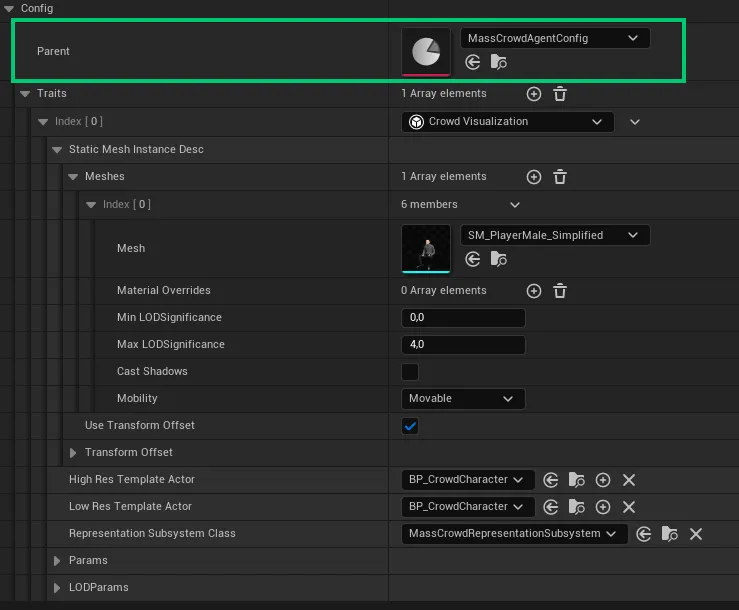
MassCrowdAgentConfig Data Asset file
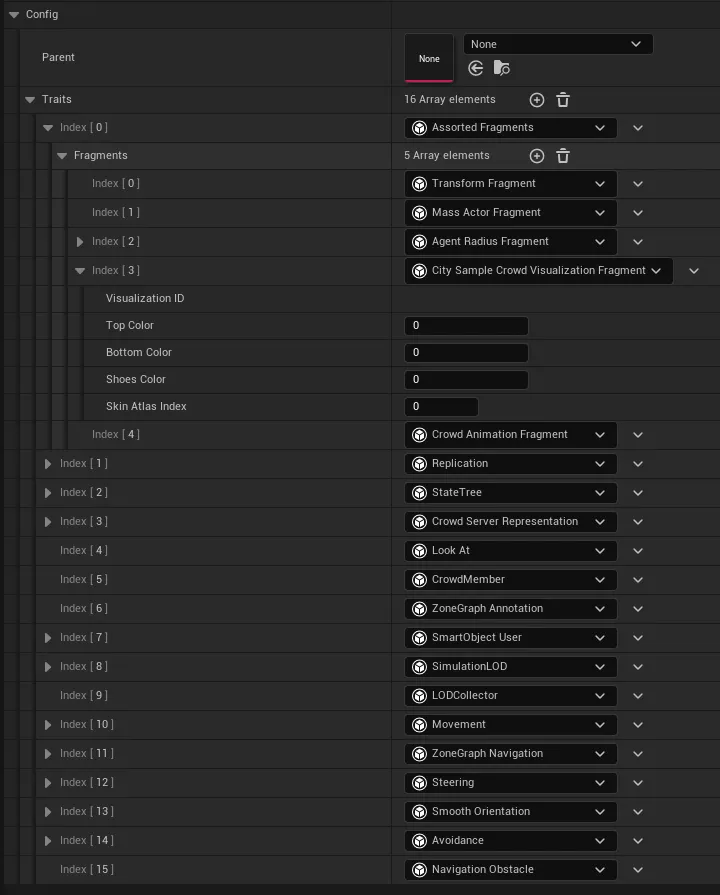
UMassMovementTrait
A System taking care about Crowd movement.
UMassApplyMovementProcessor(MassGameplay/Movement)UMassMovementTrait(MassGameplay/Movement)FMassMovementParametersshared fragment (MassGameplay)
Fragments
Assorted fragments
FCitySampleCrowdVisualizationFragment
Located at
Source/CitySample/Crowd/CrowdVisualizationFragment.hFCitySampleCrowdVisualizationFragment keeps visualization characteristic of the entity (human)
USTRUCT()
struct CITYSAMPLE_API FCitySampleCrowdVisualizationFragment : public FMassFragment
{
	GENERATED_BODY()

	UPROPERTY(EditAnywhere, Category = "")
	FCrowdVisualizationID VisualizationID;

	UPROPERTY(EditAnywhere, Category = "")
	uint32 TopColor = 0;

	UPROPERTY(EditAnywhere, Category = "")
	uint32 BottomColor = 0;

	UPROPERTY(EditAnywhere, Category = "")
	uint32 ShoesColor = 0;

	UPROPERTY(EditAnywhere, Category = "")
	uint8 SkinAtlasIndex = 0;
};
FCrowdAnimationFragment
Located at
Plugins/CitySampleMassCrowd/Source/CitySampleMassCrowd/Public/MassAnimationTypes.hUSTRUCT() struct CITYSAMPLEMASSCROWD_API FCrowdAnimationFragment : public FMassFragment { GENERATED_BODY() TWeakObjectPtr<UAnimToTextureDataAsset> AnimToTextureData; float GlobalStartTime = 0.0f; // filled by <a href="#UMassFragmentInitializer_Animation">UMassFragmentInitializer_Animation</a> float PlayRate = 1.0f; int32 AnimationStateIndex = 0; bool bSwappedThisFrame = false; };
Other fragments
FMassMontageFragment
Located at Plugins/CitySampleMassCrowd/Source/CitySampleMassCrowd/Public/MassAnimationTypes.h
USTRUCT()
struct CITYSAMPLEMASSCROWD_API FMassMontageFragment : public FMassFragment
{
	GENERATED_BODY()

	UE::VertexAnimation::FLightweightMontageInstance MontageInstance = UE::VertexAnimation::FLightweightMontageInstance();
	UE::CrowdInteractionAnim::FRequest InteractionRequest = UE::CrowdInteractionAnim::FRequest();
	UE::CrowdInteractionAnim::FMotionWarpingScratch MotionWarpingScratch = UE::CrowdInteractionAnim::FMotionWarpingScratch();
	FRootMotionMovementParams RootMotionParams = FRootMotionMovementParams();
	float SkippedTime = 0.0f;

	void Request(const UE::CrowdInteractionAnim::FRequest& InRequest);
	void Clear();
};
UCitySampleCrowdVisualizationFragmentInitializer
Located at Source/CitySample/Crowd/CrowdVisualizationCustomDataProcessor.h
A UMassProcessor that ...
#pragma once

#include "MassTranslator.h"
#include "MassRepresentationTypes.h"
#include "MassLODSubsystem.h"
#include "CrowdVisualizationCustomDataProcessor.generated.h"

class UMassCrowdRepresentationSubsystem;

UCLASS()
class UMassProcessor_CrowdVisualizationCustomData : public UMassProcessor
{
	GENERATED_BODY()

public:
	UMassProcessor_CrowdVisualizationCustomData();

protected:
	virtual void ConfigureQueries(const TSharedRef<FMassEntityManager>& EntityManager) override;
	virtual void InitializeInternal(UObject& Owner, const TSharedRef<FMassEntityManager>& EntityManager) override;
	virtual void Execute(FMassEntityManager& EntityManager, FMassExecutionContext& Context) override;

	void UpdateCrowdCustomData(FMassExecutionContext& Context);

	FMassEntityQuery EntityQuery_Conditional;

	UPROPERTY(Transient)
	UMassLODSubsystem* LODSubsystem;

	UPROPERTY(Transient)
	UWorld* World = nullptr;
};#include "CrowdVisualizationCustomDataProcessor.h"
#include "MassCrowdRepresentationSubsystem.h"
#include "MassRepresentationFragments.h"
#include "MassVisualizationComponent.h"
#include "CrowdVisualizationFragment.h"
#include "MassCrowdAnimationTypes.h"
#include "MassUpdateISMProcessor.h"
#include "MassCrowdUpdateISMVertexAnimationProcessor.h"
#include "GameFramework/PlayerController.h"
#include "MassLODFragments.h"
namespace UE::CitySampleCrowd
{
int32 bAllowKeepISMExtraFrameBetweenISM = 1;
FAutoConsoleVariableRef CVarAllowKeepISMExtraFrameBetweenISM(TEXT("CitySample.crowd.AllowKeepISMExtraFrameBetweenISM"), bAllowKeepISMExtraFrameBetweenISM, TEXT("Allow the frost crowd visulaization to keep previous ISM an extra frame when switching between ISM"), ECVF_Default);
int32 bAllowKeepISMExtraFrameWhenSwitchingToActor = 0;
FAutoConsoleVariableRef CVarAllowKeepISMExtraFrameWhenSwitchingToActor(TEXT("CitySample.crowd.AllowKeepISMExtraFrameWhenSwitchingToActor"), bAllowKeepISMExtraFrameWhenSwitchingToActor, TEXT("Allow the frost crowd visulaization to keep ISM an extra frame when switching to spanwed actor"), ECVF_Default);
}
UMassProcessor_CrowdVisualizationCustomData::UMassProcessor_CrowdVisualizationCustomData()
: EntityQuery_Conditional(*this)
{
ExecutionFlags = (int32)(EProcessorExecutionFlags::Client | EProcessorExecutionFlags::Standalone);
ExecutionOrder.ExecuteAfter.Add(UE::Mass::ProcessorGroupNames::Representation);
// Requires animation system to update vertex animation data first
ExecutionOrder.ExecuteAfter.Add(TEXT("MassProcessor_Animation"));
bRequiresGameThreadExecution = true; // due to read-write access to FMassRepresentationSubsystemSharedFragment
}
void UMassProcessor_CrowdVisualizationCustomData::ConfigureQueries()
{
EntityQuery_Conditional.AddRequirement<FCrowdAnimationFragment>(EMassFragmentAccess::ReadWrite);
EntityQuery_Conditional.AddRequirement<FCitySampleCrowdVisualizationFragment>(EMassFragmentAccess::ReadOnly);
EntityQuery_Conditional.AddRequirement<FTransformFragment>(EMassFragmentAccess::ReadOnly);
EntityQuery_Conditional.AddRequirement<FMassViewerInfoFragment>(EMassFragmentAccess::ReadOnly);
EntityQuery_Conditional.AddRequirement<FMassRepresentationFragment>(EMassFragmentAccess::ReadWrite);
EntityQuery_Conditional.AddRequirement<FMassRepresentationLODFragment>(EMassFragmentAccess::ReadOnly);
EntityQuery_Conditional.AddChunkRequirement<FMassVisualizationChunkFragment>(EMassFragmentAccess::ReadOnly);
EntityQuery_Conditional.SetChunkFilter(&FMassVisualizationChunkFragment::AreAnyEntitiesVisibleInChunk);
EntityQuery_Conditional.AddSharedRequirement<FMassRepresentationSubsystemSharedFragment>(EMassFragmentAccess::ReadWrite);
}
void UMassProcessor_CrowdVisualizationCustomData::Execute(FMassEntityManager& EntityManager, FMassExecutionContext& Context)
{
EntityQuery_Conditional.ForEachEntityChunk(EntityManager, Context, [this](FMassExecutionContext& Context)
{
UMassProcessor_CrowdVisualizationCustomData::UpdateCrowdCustomData(Context);
});
}
void UMassProcessor_CrowdVisualizationCustomData::InitializeInternal(UObject& Owner, const TSharedRef<FMassEntityManager>& EntityManager)
{
Super::InitializeInternal(Owner, EntityManager);
World = Owner.GetWorld();
check(World);
LODSubsystem = UWorld::GetSubsystem<UMassLODSubsystem>(World);
}
void UMassProcessor_CrowdVisualizationCustomData::UpdateCrowdCustomData(FMassExecutionContext& Context)
{
UMassRepresentationSubsystem* RepresentationSubsystem = Context.GetMutableSharedFragment<FMassRepresentationSubsystemSharedFragment>().RepresentationSubsystem;
check(RepresentationSubsystem);
FMassInstancedStaticMeshInfoArrayView ISMInfos = RepresentationSubsystem->GetMutableInstancedStaticMeshInfos();
const int32 NumEntities = Context.GetNumEntities();
TConstArrayView<FTransformFragment> TransformList = Context.GetFragmentView<FTransformFragment>();
TArrayView<FMassRepresentationFragment> RepresentationList = Context.GetMutableFragmentView<FMassRepresentationFragment>();
TConstArrayView<FMassViewerInfoFragment> LODInfoList = Context.GetFragmentView<FMassViewerInfoFragment>();
TConstArrayView<FMassRepresentationLODFragment> RepresentationLODList = Context.GetFragmentView<FMassRepresentationLODFragment>();
TConstArrayView<FCitySampleCrowdVisualizationFragment> CitySampleCrowdVisualizationList = Context.GetFragmentView<FCitySampleCrowdVisualizationFragment>();
TArrayView<FCrowdAnimationFragment> AnimationDataList = Context.GetMutableFragmentView<FCrowdAnimationFragment>();
// 0-4 are anim data
// 5-7 are color varations on clothing
// 5 is an atlas index on skin
const int NumCustomFloatsPerISM = 8;
const int ColorVariationIndex = 5;
const int AtlasVariationIndex = 5;
const int HeadIdx = 0;
const int BodyIdx = 1;
const int TopIdx = 2;
const int BottomIdx = 3;
const int ShoesIdx = 4;
TArray<float, TInlineAllocator<3>> CustomFloats;
CustomFloats.AddZeroed(3);
float& R = CustomFloats[0];
float& G = CustomFloats[1];
float& B = CustomFloats[2];
for (int32 EntityIdx = 0; EntityIdx < NumEntities; EntityIdx++)
{
const FTransformFragment& TransformFragment = TransformList[EntityIdx];
FMassRepresentationFragment& Representation = RepresentationList[EntityIdx];
const FMassViewerInfoFragment& LODInfo = LODInfoList[EntityIdx];
const FMassRepresentationLODFragment& RepresentationLOD = RepresentationLODList[EntityIdx];
const FCitySampleCrowdVisualizationFragment& CitySampleCrowdVisualization = CitySampleCrowdVisualizationList[EntityIdx];
FCrowdAnimationFragment& AnimationData = AnimationDataList[EntityIdx];
if (Representation.CurrentRepresentation == EMassRepresentationType::StaticMeshInstance ||
// Keeping an extra frame of ISM when switching to actors as sometime the actor isn't loaded and will not be display on lower hand platform.
( UE::CitySampleCrowd::bAllowKeepISMExtraFrameWhenSwitchingToActor &&
Representation.PrevRepresentation == EMassRepresentationType::StaticMeshInstance &&
(Representation.CurrentRepresentation == EMassRepresentationType::LowResSpawnedActor || Representation.CurrentRepresentation == EMassRepresentationType::HighResSpawnedActor)) )
{
// @todo find a better way to do this
// Skip instances unseen by ExclusiveInstanceViewerIdx
//if (ExclusiveInstanceViewerIdx == INDEX_NONE || LODInfo.bIsVisibleByViewer[ExclusiveInstanceViewerIdx])
{
FMassInstancedStaticMeshInfo& ISMInfo = ISMInfos[Representation.StaticMeshDescIndex];
const float PrevLODSignificance = UE::CitySampleCrowd::bAllowKeepISMExtraFrameBetweenISM ? Representation.PrevLODSignificance : -1.0f;
// Update Transform
UMassUpdateISMProcessor::UpdateISMTransform(GetTypeHash(Context.GetEntity(EntityIdx)), ISMInfo, TransformFragment.GetTransform(), Representation.PrevTransform, RepresentationLOD.LODSignificance, PrevLODSignificance);
// Custom data layout is 0-4 are anim data, 5-7 are color variations, 5 is an atlas index on some meshes
// Need 3 floats of padding after anim data
const int32 CustomDataPaddingAmount = 3;
// Add Vertex animation custom floats
UMassCrowdUpdateISMVertexAnimationProcessor::UpdateISMVertexAnimation(ISMInfo, AnimationData, RepresentationLOD.LODSignificance, PrevLODSignificance, CustomDataPaddingAmount);
// Add color custom floats
R = (CitySampleCrowdVisualization.TopColor >> 24) / 255.0f;
G = ((CitySampleCrowdVisualization.TopColor >> 16) & 0xff) / 255.0f;
B = ((CitySampleCrowdVisualization.TopColor >> 8) & 0xff) / 255.0f;
ISMInfo.WriteCustomDataFloatsAtStartIndex(TopIdx, CustomFloats, RepresentationLOD.LODSignificance, NumCustomFloatsPerISM, ColorVariationIndex, PrevLODSignificance);
R = (CitySampleCrowdVisualization.BottomColor >> 24) / 255.0f;
G = ((CitySampleCrowdVisualization.BottomColor >> 16) & 0xff) / 255.0f;
B = ((CitySampleCrowdVisualization.BottomColor >> 8) & 0xff) / 255.0f;
ISMInfo.WriteCustomDataFloatsAtStartIndex(BottomIdx, CustomFloats, RepresentationLOD.LODSignificance, NumCustomFloatsPerISM, ColorVariationIndex, PrevLODSignificance);
R = (CitySampleCrowdVisualization.ShoesColor >> 24) / 255.0f;
G = ((CitySampleCrowdVisualization.ShoesColor >> 16) & 0xff) / 255.0f;
B = ((CitySampleCrowdVisualization.ShoesColor >> 8) & 0xff) / 255.0f;
ISMInfo.WriteCustomDataFloatsAtStartIndex(ShoesIdx, CustomFloats, RepresentationLOD.LODSignificance, NumCustomFloatsPerISM, ColorVariationIndex, PrevLODSignificance);
// Add skin atlas custom floats
TArray<float, TInlineAllocator<1>> SkinAtlasIndex({ float(CitySampleCrowdVisualization.SkinAtlasIndex) });
ISMInfo.WriteCustomDataFloatsAtStartIndex(HeadIdx, SkinAtlasIndex, RepresentationLOD.LODSignificance, NumCustomFloatsPerISM, AtlasVariationIndex, PrevLODSignificance);
ISMInfo.WriteCustomDataFloatsAtStartIndex(BodyIdx, SkinAtlasIndex, RepresentationLOD.LODSignificance, NumCustomFloatsPerISM, AtlasVariationIndex, PrevLODSignificance);
}
}
Representation.PrevTransform = TransformFragment.GetTransform();
Representation.PrevLODSignificance = RepresentationLOD.LODSignificance;
}
}
CrowdCharacterActor.cpp
UMassCrowdUpdateISMVertexAnimationProcessor
Located at Plugins/CitySampleMassCrowd/Source/CitySampleMassCrowd/Public/MassCrowdUpdateISMVertexAnimationProcessor.h
A UMassUpdateISMProcessor that ...
#include "MassUpdateISMProcessor.h"

#include "MassCrowdUpdateISMVertexAnimationProcessor.generated.h"

struct FMassInstancedStaticMeshInfo;
struct FCrowdAnimationFragment;

UCLASS()
class CITYSAMPLEMASSCROWD_API UMassCrowdUpdateISMVertexAnimationProcessor : public UMassUpdateISMProcessor
{
	GENERATED_BODY()
public:
	UMassCrowdUpdateISMVertexAnimationProcessor();

	static void UpdateISMVertexAnimation(FMassInstancedStaticMeshInfo& ISMInfo, FCrowdAnimationFragment& AnimationData, const float LODSignificance, const float PrevLODSignificance, const int32 NumFloatsToPad = 0);

protected:

	/** Configure the owned FMassEntityQuery instances to express processor's requirements */
	virtual void ConfigureQueries() override;

	/**
	 * Execution method for this processor
	 * @param EntitySubsystem is the system to execute the lambdas on each entity chunk
	 * @param Context is the execution context to be passed when executing the lambdas */
	virtual void Execute(FMassEntityManager& EntityManager, FMassExecutionContext& Context) override;
};#include "MassCrowdUpdateISMVertexAnimationProcessor.h"
#include "MassVisualizationComponent.h"
#include "MassRepresentationSubsystem.h"
#include "MassEntityManager.h"
#include "MassExecutionContext.h"
#include "MassRepresentationFragments.h"
#include "MassCommonFragments.h"
#include "MassLODFragments.h"
#include "MassCrowdAnimationTypes.h"
#include "AnimToTextureInstancePlaybackHelpers.h"
#include "MassCommonTypes.h"
#include "MassCrowdRepresentationSubsystem.h"
UMassCrowdUpdateISMVertexAnimationProcessor::UMassCrowdUpdateISMVertexAnimationProcessor()
{
ExecutionOrder.ExecuteAfter.Add(UE::Mass::ProcessorGroupNames::Tasks);
}
void UMassCrowdUpdateISMVertexAnimationProcessor::ConfigureQueries()
{
Super::ConfigureQueries();
EntityQuery.AddRequirement<FCrowdAnimationFragment>(EMassFragmentAccess::ReadWrite);
}
void UMassCrowdUpdateISMVertexAnimationProcessor::Execute(FMassEntityManager& EntityManager, FMassExecutionContext& Context)
{
EntityQuery.ForEachEntityChunk(EntityManager, Context, [](FMassExecutionContext& Context)
{
UMassRepresentationSubsystem* RepresentationSubsystem = Context.GetSharedFragment<FMassRepresentationSubsystemSharedFragment>().RepresentationSubsystem;
check(RepresentationSubsystem);
FMassInstancedStaticMeshInfoArrayView ISMInfo = RepresentationSubsystem->GetMutableInstancedStaticMeshInfos();
TConstArrayView<FTransformFragment> TransformList = Context.GetFragmentView<FTransformFragment>();
TArrayView<FMassRepresentationFragment> RepresentationList = Context.GetMutableFragmentView<FMassRepresentationFragment>();
TConstArrayView<FMassRepresentationLODFragment> RepresentationLODList = Context.GetFragmentView<FMassRepresentationLODFragment>();
TArrayView<FCrowdAnimationFragment> AnimationDataList = Context.GetMutableFragmentView<FCrowdAnimationFragment>();
const int32 NumEntities = Context.GetNumEntities();
for (int32 EntityIdx = 0; EntityIdx < NumEntities; EntityIdx++)
{
const FMassEntityHandle Entity = Context.GetEntity(EntityIdx);
const FTransformFragment& TransformFragment = TransformList[EntityIdx];
const FMassRepresentationLODFragment& RepresentationLOD = RepresentationLODList[EntityIdx];
FMassRepresentationFragment& Representation = RepresentationList[EntityIdx];
FCrowdAnimationFragment& AnimationData = AnimationDataList[EntityIdx];
if (Representation.CurrentRepresentation == EMassRepresentationType::StaticMeshInstance)
{
UpdateISMTransform(GetTypeHash(Context.GetEntity(EntityIdx)), ISMInfo[Representation.StaticMeshDescIndex], TransformFragment.GetTransform(), Representation.PrevTransform, RepresentationLOD.LODSignificance, Representation.PrevLODSignificance);
UpdateISMVertexAnimation(ISMInfo[Representation.StaticMeshDescIndex], AnimationData, RepresentationLOD.LODSignificance, Representation.PrevLODSignificance);
}
Representation.PrevTransform = TransformFragment.GetTransform();
Representation.PrevLODSignificance = RepresentationLOD.LODSignificance;
}
});
}
void UMassCrowdUpdateISMVertexAnimationProcessor::UpdateISMVertexAnimation(FMassInstancedStaticMeshInfo& ISMInfo, FCrowdAnimationFragment& AnimationData, const float LODSignificance, const float PrevLODSignificance, const int32 NumFloatsToPad /*= 0*/)
{
FAnimToTextureInstancePlaybackData InstanceData;
UAnimToTextureInstancePlaybackLibrary::AnimStateFromDataAsset(AnimationData.AnimToTextureData.Get(), AnimationData.AnimationStateIndex, InstanceData.CurrentState);
InstanceData.CurrentState.GlobalStartTime = AnimationData.GlobalStartTime;
InstanceData.CurrentState.PlayRate = AnimationData.PlayRate;
ISMInfo.AddBatchedCustomData<FAnimToTextureInstancePlaybackData>(InstanceData, LODSignificance, PrevLODSignificance, NumFloatsToPad);
}
MassCrowdAnimationProcessor
Located at Plugins/CitySampleMassCrowd/Source/CitySampleMassCrowd/Public/MassCrowdAnimationProcessor.h
MassCrowdAnimationProcessor source code file contain 2 processors:
UMassFragmentInitializer_Animation (UMassObserverProcessor)
It sets
GlobalStartTimevalue atFCrowdAnimationFragment fragment..hUCLASS() class CITYSAMPLEMASSCROWD_API UMassFragmentInitializer_Animation : public UMassObserverProcessor { GENERATED_BODY() public: UMassFragmentInitializer_Animation(); protected: virtual void ConfigureQueries() override; virtual void Initialize(UObject& Owner) override; virtual void Execute(FMassEntityManager& EntityManager, FMassExecutionContext& Context) override; UPROPERTY() UWorld* World = nullptr; FMassEntityQuery EntityQuery; };.cppUMassFragmentInitializer_Animation::UMassFragmentInitializer_Animation() : EntityQuery(*this) { ObservedType = FCrowdAnimationFragment::StaticStruct(); Operation = EMassObservedOperation::Add; ExecutionFlags = (int32)(EProcessorExecutionFlags::Client | EProcessorExecutionFlags::Standalone); } void UMassFragmentInitializer_Animation::ConfigureQueries() { EntityQuery.AddRequirement<FCrowdAnimationFragment>(EMassFragmentAccess::ReadWrite); } void UMassFragmentInitializer_Animation::InitializeInternal(UObject& Owner, const TSharedRef<FMassEntityManager>& EntityManager) { Super::InitializeInternal(Owner, EntityManager); World = Owner.GetWorld(); } void UMassFragmentInitializer_Animation::Execute(FMassEntityManager& EntityManager, FMassExecutionContext& Context) { check(World); const float GlobalTime = World->GetTimeSeconds(); EntityQuery.ForEachEntityChunk(EntityManager, Context, [this, GlobalTime](FMassExecutionContext& Context) { TArrayView<FCrowdAnimationFragment> AnimationDataList = Context.GetMutableFragmentView<FCrowdAnimationFragment>(); const int32 NumEntities = Context.GetNumEntities(); for (int32 EntityIdx = 0; EntityIdx < NumEntities; EntityIdx++) { FCrowdAnimationFragment& AnimationData = AnimationDataList[EntityIdx]; // @todo: Replace this range w/ the length of the starting animation states. const float StartTimeOffset = FMath::FRandRange(0.0f, 10.0f); AnimationData.GlobalStartTime = GlobalTime - StartTimeOffset; } }); }UMassProcessor_Animation (UMassProcessor)
It updates animations for all entity types (entities as well as actors)
.h#include "MassObserverProcessor.h" #include "MassRepresentationTypes.h" #include "MassCrowdAnimationProcessor.generated.h" class UAnimToTextureDataAsset; struct FMassActorFragment; // UMassFragmentInitializer_Animation .h source code UCLASS() class CITYSAMPLEMASSCROWD_API UMassProcessor_Animation : public UMassProcessor { GENERATED_BODY() public: UMassProcessor_Animation(); UPROPERTY(EditAnywhere, Category="Animation", meta=(ClampMin=0.0, UIMin=0.0)) float MoveThresholdSq = 750.0f; private: void UpdateAnimationFragmentData(FMassEntityManager& EntityManager, FMassExecutionContext& Context, float GlobalTime, TArray<FMassEntityHandle, TInlineAllocator<32>>& ActorEntities); void UpdateVertexAnimationState(FMassEntityManager& EntityManager, FMassExecutionContext& Context, float GlobalTime); void UpdateSkeletalAnimation(FMassEntityManager& EntityManager, float GlobalTime, TArrayView<FMassEntityHandle> ActorEntities); protected: /** Configure the owned FMassEntityQuery instances to express processor's requirements */ virtual void ConfigureQueries() override; virtual void Initialize(UObject& Owner) override; virtual void Execute(FMassEntityManager& EntityManager, FMassExecutionContext& Context) override; static class UAnimInstance* GetAnimInstanceFromActor(const class AActor* Actor); UPROPERTY(Transient) UWorld* World = nullptr; FMassEntityQuery AnimationEntityQuery_Conditional; FMassEntityQuery MontageEntityQuery; FMassEntityQuery MontageEntityQuery_Conditional; };.cpp#include "MassCrowdAnimationProcessor.h" #include "Animation/AnimInstance.h" #include "Components/SkeletalMeshComponent.h" #include "AnimToTextureInstancePlaybackHelpers.h" #include "MassCrowdRepresentationSubsystem.h" #include "MassVisualizationComponent.h" #include "MassRepresentationFragments.h" #include "ContextualAnimSceneAsset.h" #include "AnimToTextureDataAsset.h" #include "MassActorSubsystem.h" #include "MassCommonFragments.h" #include "MassExecutionContext.h" #include "MassCrowdAnimationTypes.h" #include "MassLookAtFragments.h" #include "MassLODFragments.h" #include "MassRepresentationTypes.h" #include "MotionWarpingComponent.h" #include "Animation/MassCrowdAnimInstance.h" #include "Animation/MassPlayerAnimInstance.h" #include "MassEntityView.h" #include "MassAIBehaviorTypes.h" #include "MassNavigationFragments.h" #include "Steering/MassSteeringFragments.h" #include "MassMovementFragments.h" #include "GameFramework/Character.h" #include "Kismet/GameplayStatics.h" // UMassFragmentInitializer_Animation .cpp source code UMassProcessor_Animation::UMassProcessor_Animation() : AnimationEntityQuery_Conditional(*this) , MontageEntityQuery(*this) , MontageEntityQuery_Conditional(*this) { ExecutionFlags = (int32)(EProcessorExecutionFlags::Client | EProcessorExecutionFlags::Standalone); ExecutionOrder.ExecuteInGroup = UE::Mass::ProcessorGroupNames::Tasks; ExecutionOrder.ExecuteAfter.Add(UE::Mass::ProcessorGroupNames::SyncWorldToMass); ExecutionOrder.ExecuteAfter.Add(UE::Mass::ProcessorGroupNames::Representation); bRequiresGameThreadExecution = true; } void UMassProcessor_Animation::UpdateAnimationFragmentData(FMassEntityManager& EntityManager, FMassExecutionContext& Context, float GlobalTime, TArray<FMassEntityHandle, TInlineAllocator<32>>& ActorEntities) { TArrayView<FCrowdAnimationFragment> AnimationDataList = Context.GetMutableFragmentView<FCrowdAnimationFragment>(); TConstArrayView<FMassMontageFragment> MontageDataList = Context.GetFragmentView<FMassMontageFragment>(); TConstArrayView<FMassRepresentationFragment> VisualizationList = Context.GetFragmentView<FMassRepresentationFragment>(); TConstArrayView<FMassActorFragment> ActorInfoList = Context.GetFragmentView<FMassActorFragment>(); const int32 NumEntities = Context.GetNumEntities(); for (int32 EntityIdx = 0; EntityIdx < NumEntities; EntityIdx++) { FCrowdAnimationFragment& AnimationData = AnimationDataList[EntityIdx]; const FMassRepresentationFragment& Visualization = VisualizationList[EntityIdx]; const FMassActorFragment& ActorFragment = ActorInfoList[EntityIdx]; if (!ActorFragment.IsOwnedByMass()) { continue; } const bool bWasActor = (Visualization.PrevRepresentation == EMassRepresentationType::HighResSpawnedActor) || (Visualization.PrevRepresentation == EMassRepresentationType::LowResSpawnedActor); const bool bIsActor = (Visualization.CurrentRepresentation == EMassRepresentationType::HighResSpawnedActor) || (Visualization.CurrentRepresentation == EMassRepresentationType::LowResSpawnedActor); AnimationData.bSwappedThisFrame = (bWasActor != bIsActor); if (!MontageDataList.IsEmpty() && MontageDataList[EntityIdx].MontageInstance.SequenceChangedThisFrame()) { AnimationData.GlobalStartTime = GlobalTime - MontageDataList[EntityIdx].MontageInstance.GetPositionInSection(); } switch (Visualization.CurrentRepresentation) { case EMassRepresentationType::LowResSpawnedActor: case EMassRepresentationType::HighResSpawnedActor: { FMassEntityHandle Entity = Context.GetEntity(EntityIdx); ActorEntities.Add(Entity); break; } default: break; } } } void UMassProcessor_Animation::UpdateVertexAnimationState(FMassEntityManager& EntityManager, FMassExecutionContext& Context, float GlobalTime) { const int32 NumEntities = Context.GetNumEntities(); TArrayView<FCrowdAnimationFragment> AnimationDataList = Context.GetMutableFragmentView<FCrowdAnimationFragment>(); TConstArrayView<FMassMontageFragment> MontageDataList = Context.GetFragmentView<FMassMontageFragment>(); TConstArrayView<FMassRepresentationFragment> VisualizationList = Context.GetFragmentView<FMassRepresentationFragment>(); TConstArrayView<FMassRepresentationLODFragment> RepresentationLODList = Context.GetFragmentView<FMassRepresentationLODFragment>(); TConstArrayView<FMassVelocityFragment> VelocityList = Context.GetFragmentView<FMassVelocityFragment>(); for (int32 EntityIdx = 0; EntityIdx < NumEntities; EntityIdx++) { FCrowdAnimationFragment& AnimationData = AnimationDataList[EntityIdx]; const FMassRepresentationFragment& Visualization = VisualizationList[EntityIdx]; const FMassVelocityFragment& Velocity = VelocityList[EntityIdx]; // Need current anim state to update for skeletal meshes to do a smooth blend between poses if (Visualization.CurrentRepresentation != EMassRepresentationType::None) { int32 StateIndex = 0; FMassEntityHandle Entity = Context.GetEntity(EntityIdx); const UAnimSequence* Sequence = MontageDataList.IsEmpty() ? nullptr : MontageDataList[EntityIdx].MontageInstance.GetSequence(); if (Sequence) { StateIndex = AnimationData.AnimToTextureData.IsValid() ? AnimationData.AnimToTextureData->GetIndexFromAnimSequence(Sequence) : 0; } else { // @todo: Make a better way to map desired anim states here. Currently the anim texture index to access is hard-coded. const float VelocitySizeSq = Velocity.Value.SizeSquared(); const bool bIsWalking = Velocity.Value.SizeSquared() > MoveThresholdSq; if(bIsWalking) { StateIndex = 1; const float AuthoredAnimSpeed = 140.0f; const float PrevPlayRate = AnimationData.PlayRate; AnimationData.PlayRate = FMath::Clamp(FMath::Sqrt(VelocitySizeSq / (AuthoredAnimSpeed * AuthoredAnimSpeed)), 0.8f, 2.0f); // Need to conserve current frame on a playrate switch so (GlobalTime - Offset1) * Playrate1 == (GlobalTime - Offset2) * Playrate2 AnimationData.GlobalStartTime = GlobalTime - PrevPlayRate * (GlobalTime - AnimationData.GlobalStartTime) / AnimationData.PlayRate; } else { AnimationData.PlayRate = 1.0f; StateIndex = 0; } } AnimationData.AnimationStateIndex = StateIndex; } } } void UMassProcessor_Animation::UpdateSkeletalAnimation(FMassEntityManager& EntityManager, float GlobalTime, TArrayView<FMassEntityHandle> ActorEntities) { if (ActorEntities.Num() <= 0) { return; } // Grab player's spatial data FVector PlayerMeshLocation = FVector::ZeroVector; FRotator PlayerMeshRotation = FRotator::ZeroRotator; FVector2D PlayerVelocity2D = FVector2D::ZeroVector; // Assume single player if (const ACharacter* PlayerChar = UGameplayStatics::GetPlayerCharacter(this, 0)) { UMassPlayerAnimInstance* PlayerAnimInstance = nullptr; if (const USkeletalMeshComponent* PlayerMesh = PlayerChar->GetMesh()) { PlayerMeshLocation = PlayerMesh->GetComponentLocation(); PlayerMeshRotation = PlayerMesh->GetComponentRotation(); PlayerAnimInstance = Cast<UMassPlayerAnimInstance>(PlayerMesh->GetAnimInstance()); } FVector PlayerVelocity = PlayerChar->GetVelocity(); PlayerVelocity2D = FVector2D(PlayerVelocity.X, PlayerVelocity.Y); if (PlayerAnimInstance) { const ACharacter* ClosestCharacter = nullptr; float MinDistSq = INFINITY; for (FMassEntityHandle& Entity : ActorEntities) { FMassEntityView EntityView(EntityManager, Entity); const FMassActorFragment& ActorFragment = EntityView.GetFragmentData<FMassActorFragment>(); if (const ACharacter* OtherCharacter = Cast<ACharacter>(ActorFragment.Get())) { float NewDistSq = FVector::DistSquared(OtherCharacter->GetActorLocation(), PlayerMeshLocation); if (NewDistSq < MinDistSq) { MinDistSq = NewDistSq; ClosestCharacter = OtherCharacter; } } } if (ClosestCharacter) { if (const USkeletalMeshComponent* OtherMesh = ClosestCharacter->GetMesh()) { PlayerAnimInstance->CrowdProximity.OtherMeshLocation = OtherMesh->GetComponentLocation(); PlayerAnimInstance->CrowdProximity.OtherMeshRotation = OtherMesh->GetComponentRotation(); } FVector OtherVelocity = ClosestCharacter->GetVelocity(); PlayerAnimInstance->CrowdProximity.OtherVelocity2D = FVector2D(OtherVelocity.X, OtherVelocity.Y); } } } for (FMassEntityHandle& Entity : ActorEntities) { FMassEntityView EntityView(EntityManager, Entity); FCrowdAnimationFragment& AnimationData = EntityView.GetFragmentData<FCrowdAnimationFragment>(); FTransformFragment& TransformFragment = EntityView.GetFragmentData<FTransformFragment>(); FMassRepresentationFragment& Visualization = EntityView.GetFragmentData<FMassRepresentationFragment>(); const FMassActorFragment& ActorFragment = EntityView.GetFragmentData<FMassActorFragment>(); const FMassLookAtFragment* LookAtFragment = EntityView.GetFragmentDataPtr<FMassLookAtFragment>(); const FMassMoveTargetFragment* MovementTargetFragment = EntityView.GetFragmentDataPtr<FMassMoveTargetFragment>(); const FMassSteeringFragment* SteeringFragment = EntityView.GetFragmentDataPtr<FMassSteeringFragment>(); const AActor* Actor = ActorFragment.Get(); UAnimInstance* AnimInstance = GetAnimInstanceFromActor(Actor); // If we're using a mass anim instance, pass the data we need. // @todo: This could potentially cause problems if it happens during an animation update if (UMassCrowdAnimInstance* MassAnimInstance = Cast<UMassCrowdAnimInstance>(AnimInstance)) { FMassCrowdAnimInstanceData AnimInstanceData; AnimInstanceData.MassEntityTransform = TransformFragment.GetTransform(); AnimInstanceData.LookAtDirection = LookAtFragment ? LookAtFragment->Direction : FVector::ForwardVector; AnimInstanceData.FarLODAnimSequence = nullptr; AnimInstanceData.FarLODPlaybackStartTime = 0.0f; if (AnimationData.AnimToTextureData.IsValid() && AnimationData.AnimToTextureData->Animations.IsValidIndex(AnimationData.AnimationStateIndex)) { AnimInstanceData.FarLODAnimSequence = AnimationData.AnimToTextureData->AnimSequences[AnimationData.AnimationStateIndex].AnimSequence; if (AnimInstanceData.FarLODAnimSequence) { AnimInstanceData.FarLODAnimSequence = AnimationData.AnimToTextureData->AnimSequences[AnimationData.AnimationStateIndex].AnimSequence; const float SequenceLength = AnimInstanceData.FarLODAnimSequence->GetPlayLength(); AnimInstanceData.FarLODPlaybackStartTime = FMath::Fmod(AnimationData.GlobalStartTime - GlobalTime,SequenceLength); if (AnimInstanceData.FarLODPlaybackStartTime < 0.0f) { AnimInstanceData.FarLODPlaybackStartTime += SequenceLength; } } } AnimInstanceData.Significance = EntityView.GetFragmentData<FMassRepresentationLODFragment>().LODSignificance; AnimInstanceData.bSwappedThisFrame = AnimationData.bSwappedThisFrame; MassAnimInstance->SetMassAnimInstanceData(AnimInstanceData); MassAnimInstance->PlayerProximityData.OtherMeshLocation = PlayerMeshLocation; MassAnimInstance->PlayerProximityData.OtherMeshRotation = PlayerMeshRotation; MassAnimInstance->PlayerProximityData.OtherVelocity2D = PlayerVelocity2D; if (SteeringFragment) { MassAnimInstance->MassMovementInfo.DesiredVelocity = SteeringFragment->DesiredVelocity; } if (MovementTargetFragment) { MassAnimInstance->MassMovementInfo.CurrentActionStartTime = MovementTargetFragment->GetCurrentActionStartTime(); MassAnimInstance->MassMovementInfo.CurrentActionID = MovementTargetFragment->GetCurrentActionID(); MassAnimInstance->MassMovementInfo.PreviousMovementAction = MovementTargetFragment->GetPreviousAction(); MassAnimInstance->MassMovementInfo.CurrentMovementAction = MovementTargetFragment->GetCurrentAction(); MassAnimInstance->StopPredictionData.DistanceToEndOfPath = MovementTargetFragment->DistanceToGoal; MassAnimInstance->StopPredictionData.ActionAtEndOfPath = MovementTargetFragment->IntentAtGoal; } } const FMassMontageFragment* MontageFragment = EntityManager.GetFragmentDataPtr<FMassMontageFragment>(Entity); UAnimMontage* Montage = MontageFragment ? MontageFragment->MontageInstance.GetMontage() : nullptr; if (Montage == nullptr) { continue; } if (AnimInstance && Actor) { // Don't play the montage again, even if it's blending out. UAnimInstance::GetCurrentActiveMontage and AnimInstance::Montage_IsPlaying return false if the montage is blending out. bool bMontageAlreadyPlaying = false; for (int32 InstanceIndex = 0; InstanceIndex < AnimInstance->MontageInstances.Num(); InstanceIndex++) { FAnimMontageInstance* MontageInstance = AnimInstance->MontageInstances[InstanceIndex]; if (MontageInstance && MontageInstance->Montage == Montage && MontageInstance->IsPlaying()) { bMontageAlreadyPlaying = true; } } if (!bMontageAlreadyPlaying) { UMotionWarpingComponent* MotionWarpingComponent = Actor->FindComponentByClass<UMotionWarpingComponent>(); if (MotionWarpingComponent && MontageFragment->InteractionRequest.AlignmentTrack != NAME_None) { const FName SyncPointName = MontageFragment->InteractionRequest.AlignmentTrack; const FTransform& SyncTransform = MontageFragment->InteractionRequest.QueryResult.SyncTransform; MotionWarpingComponent->AddOrUpdateWarpTargetFromTransform(SyncPointName, SyncTransform); } FAlphaBlendArgs BlendIn; BlendIn = Montage->GetBlendInArgs(); // Instantly blend in if we swapped to skeletal mesh this frame to avoid pop BlendIn.BlendTime = AnimationData.bSwappedThisFrame ? 0.0f : BlendIn.BlendTime; AnimInstance->Montage_PlayWithBlendIn(Montage, BlendIn, 1.0f, EMontagePlayReturnType::MontageLength, MontageFragment->MontageInstance.GetPosition()); } // Force an animation update if we swapped this frame to prevent t-posing if (AnimationData.bSwappedThisFrame) { if (USkeletalMeshComponent* OwningComp = AnimInstance->GetOwningComponent()) { TArray<USkeletalMeshComponent*> MeshComps; // Tick main component and all attached parts to avoid a frame of t-posing // We have to refresh bone transforms too because this can happen after the render state has been updated OwningComp->TickAnimation(0.0f, false); OwningComp->RefreshBoneTransforms(); Actor->GetComponents<USkeletalMeshComponent>(MeshComps, true); MeshComps.Remove(OwningComp); for (USkeletalMeshComponent* MeshComp : MeshComps) { MeshComp->TickAnimation(0.0f, false); MeshComp->RefreshBoneTransforms(); } } } } } } void UMassProcessor_Animation::ConfigureQueries() { AnimationEntityQuery_Conditional.AddRequirement<FTransformFragment>(EMassFragmentAccess::ReadWrite); AnimationEntityQuery_Conditional.AddRequirement<FMassRepresentationFragment>(EMassFragmentAccess::ReadOnly); AnimationEntityQuery_Conditional.AddRequirement<FMassRepresentationLODFragment>(EMassFragmentAccess::ReadOnly); AnimationEntityQuery_Conditional.AddRequirement<FMassActorFragment>(EMassFragmentAccess::ReadWrite); AnimationEntityQuery_Conditional.AddRequirement<FMassVelocityFragment>(EMassFragmentAccess::ReadOnly); AnimationEntityQuery_Conditional.AddRequirement<FMassLookAtFragment>(EMassFragmentAccess::ReadOnly, EMassFragmentPresence::Optional); AnimationEntityQuery_Conditional.AddRequirement<FMassMoveTargetFragment>(EMassFragmentAccess::ReadOnly, EMassFragmentPresence::Optional); AnimationEntityQuery_Conditional.AddRequirement<FCrowdAnimationFragment>(EMassFragmentAccess::ReadWrite); AnimationEntityQuery_Conditional.AddRequirement<FMassMontageFragment>(EMassFragmentAccess::ReadWrite, EMassFragmentPresence::Optional); AnimationEntityQuery_Conditional.AddChunkRequirement<FMassVisualizationChunkFragment>(EMassFragmentAccess::ReadOnly); AnimationEntityQuery_Conditional.SetChunkFilter(&FMassVisualizationChunkFragment::AreAnyEntitiesVisibleInChunk); AnimationEntityQuery_Conditional.RequireMutatingWorldAccess(); MontageEntityQuery.AddRequirement<FTransformFragment>(EMassFragmentAccess::ReadWrite); MontageEntityQuery.AddRequirement<FMassRepresentationFragment>(EMassFragmentAccess::ReadOnly); MontageEntityQuery.AddRequirement<FMassRepresentationLODFragment>(EMassFragmentAccess::ReadOnly); MontageEntityQuery.AddRequirement<FMassActorFragment>(EMassFragmentAccess::ReadWrite); MontageEntityQuery.AddRequirement<FCrowdAnimationFragment>(EMassFragmentAccess::ReadOnly); MontageEntityQuery.AddRequirement<FMassMontageFragment>(EMassFragmentAccess::ReadWrite); MontageEntityQuery.AddChunkRequirement<FMassVisualizationChunkFragment>(EMassFragmentAccess::ReadOnly); MontageEntityQuery.RequireMutatingWorldAccess(); MontageEntityQuery_Conditional = MontageEntityQuery; MontageEntityQuery_Conditional.SetChunkFilter(&FMassVisualizationChunkFragment::AreAnyEntitiesVisibleInChunk); MontageEntityQuery_Conditional.RequireMutatingWorldAccess(); } void UMassProcessor_Animation::InitializeInternal(UObject& Owner, const TSharedRef<FMassEntityManager>& EntityManager) { Super::InitializeInternal(Owner, EntityManager); World = Owner.GetWorld(); check(World); } void UMassProcessor_Animation::Execute(FMassEntityManager& EntityManager, FMassExecutionContext& Context) { check(World); QUICK_SCOPE_CYCLE_COUNTER(UMassProcessor_Animation_Run); const float GlobalTime = World->GetTimeSeconds(); TArray<FMassEntityHandle, TInlineAllocator<32>> ActorEntities; { QUICK_SCOPE_CYCLE_COUNTER(UMassProcessor_Animation_UpdateMontage); MontageEntityQuery.ForEachEntityChunk(EntityManager, Context, [this, GlobalTime, &ActorEntities, &EntityManager](FMassExecutionContext& Context) { const int32 NumEntities = Context.GetNumEntities(); TArrayView<FMassMontageFragment> MontageDataList = Context.GetMutableFragmentView<FMassMontageFragment>(); if (!FMassVisualizationChunkFragment::AreAnyEntitiesVisibleInChunk(Context)) { for (int32 EntityIdx = 0; EntityIdx < NumEntities; EntityIdx++) { // If we are not updating animation, we still need to accumulate skipped time to fixup animation on the next update. FMassMontageFragment& MontageData = MontageDataList[EntityIdx]; MontageData.SkippedTime += Context.GetDeltaTimeSeconds(); } } else { TConstArrayView<FMassRepresentationFragment> VisualizationList = Context.GetFragmentView<FMassRepresentationFragment>(); for (int32 EntityIdx = 0; EntityIdx < NumEntities; EntityIdx++) { const FMassRepresentationFragment& Visualization = VisualizationList[EntityIdx]; if (Visualization.CurrentRepresentation == EMassRepresentationType::None) { continue; } FMassMontageFragment& MontageFragment = MontageDataList[EntityIdx]; const float MontagePositionPreAdvance = MontageFragment.MontageInstance.GetPosition(); const float MontageLength = MontageFragment.MontageInstance.GetLength(); float AdjustedDeltaTime = Context.GetDeltaTimeSeconds() + MontageFragment.SkippedTime; const float AdjustedPositionPostAdvance = MontagePositionPreAdvance + AdjustedDeltaTime; if (AdjustedPositionPostAdvance > MontageLength) { // If we've skipped over the remaining duration of the montage clear our fragment MontageFragment.Clear(); Context.Defer().PushCommand<FMassCommandRemoveFragments<FMassMontageFragment>>(Context.GetEntity(EntityIdx)); } else { MontageFragment.RootMotionParams.Clear(); UE::VertexAnimation::FLightWeightMontageExtractionSettings ExtractionSettings; if (MontageFragment.InteractionRequest.AlignmentTrack != NAME_None && MontageFragment.SkippedTime > 0.0f) { const UContextualAnimSceneAsset* ContextualAnimAsset = MontageFragment.InteractionRequest.ContextualAnimAsset.Get(); if (ContextualAnimAsset) { FContextualAnimQueryResult& QueryResult = MontageFragment.InteractionRequest.QueryResult; const FContextualAnimTrack* AnimData = ContextualAnimAsset->GetAnimTrack(0, QueryResult.AnimSetIdx, MontageFragment.InteractionRequest.InteractorRole); const float WarpDuration = AnimData ? AnimData->GetSyncTimeForWarpSection(0) : 0.f; const float WarpDurationSkippedDelta = WarpDuration - MontagePositionPreAdvance; if (MontageFragment.SkippedTime > WarpDurationSkippedDelta) { // If we skipped past the warp, don't extract root motion for that portion, because we want to snap to the warp target before applying root motion. ExtractionSettings.bExtractRootMotion = false; MontageFragment.MontageInstance.Advance(WarpDurationSkippedDelta, GlobalTime, MontageFragment.RootMotionParams, ExtractionSettings); // Remaining time delta should not include warp duration we skipped AdjustedDeltaTime -= WarpDurationSkippedDelta; } } } ExtractionSettings.bExtractRootMotion = true; MontageFragment.MontageInstance.Advance(AdjustedDeltaTime, GlobalTime, MontageFragment.RootMotionParams, ExtractionSettings); } } } }); } { QUICK_SCOPE_CYCLE_COUNTER(UMassProcessor_Animation_UpdateAnimationFragmentData); AnimationEntityQuery_Conditional.ForEachEntityChunk(EntityManager, Context, [this, GlobalTime, &ActorEntities, &EntityManager](FMassExecutionContext& Context) { UMassProcessor_Animation::UpdateAnimationFragmentData(EntityManager, Context, GlobalTime, ActorEntities); }); } { QUICK_SCOPE_CYCLE_COUNTER(UMassProcessor_Animation_UpdateVertexAnimationState); AnimationEntityQuery_Conditional.ForEachEntityChunk(EntityManager, Context, [this, GlobalTime, &EntityManager](FMassExecutionContext& Context) { UMassProcessor_Animation::UpdateVertexAnimationState(EntityManager, Context, GlobalTime); }); } { QUICK_SCOPE_CYCLE_COUNTER(UMassProcessor_Animation_ConsumeRootMotion); MontageEntityQuery_Conditional.ForEachEntityChunk(EntityManager, Context, [this, &EntityManager](FMassExecutionContext& Context) { TArrayView<FTransformFragment> TransformList = Context.GetMutableFragmentView<FTransformFragment>(); TConstArrayView<FMassRepresentationFragment> VisualizationList = Context.GetFragmentView<FMassRepresentationFragment>(); TConstArrayView<FCrowdAnimationFragment> AnimationDataList = Context.GetFragmentView<FCrowdAnimationFragment>(); TArrayView<FMassMontageFragment> MontageDataList = Context.GetMutableFragmentView<FMassMontageFragment>(); const int32 NumEntities = Context.GetNumEntities(); for (int32 EntityIdx = 0; EntityIdx < NumEntities; EntityIdx++) { const FMassRepresentationFragment& Visualization = VisualizationList[EntityIdx]; if (Visualization.CurrentRepresentation == EMassRepresentationType::None) { continue; } const FCrowdAnimationFragment& AnimationData = AnimationDataList[EntityIdx]; FTransformFragment& TransformFragment = TransformList[EntityIdx]; FMassMontageFragment& MontageFragment = MontageDataList[EntityIdx]; const UContextualAnimSceneAsset* ContextualAnimAsset = MontageFragment.InteractionRequest.ContextualAnimAsset.Get(); if (MontageFragment.InteractionRequest.AlignmentTrack != NAME_None && MontageFragment.MontageInstance.IsValid() && ContextualAnimAsset) { FContextualAnimQueryResult& QueryResult = MontageFragment.InteractionRequest.QueryResult; const FContextualAnimTrack* AnimData = ContextualAnimAsset->GetAnimTrack(0, QueryResult.AnimSetIdx, MontageFragment.InteractionRequest.InteractorRole); const float WarpDuration = AnimData ? AnimData->GetSyncTimeForWarpSection(0) : 0.f; const float MontagePosition = MontageFragment.MontageInstance.GetPosition(); FVector TargetLocation; FQuat TargetRotation; const FTransform& PrevTransform = TransformFragment.GetTransform(); FQuat PrevRot = PrevTransform.GetRotation(); FVector PrevLoc = PrevTransform.GetTranslation(); // Simple lerp towards interaction sync point UE::CrowdInteractionAnim::FMotionWarpingScratch& Scratch = MontageFragment.MotionWarpingScratch; if (MontagePosition < WarpDuration) { if (Scratch.Duration < 0.0f) { Scratch.InitialLocation = PrevLoc; Scratch.InitialRotation = PrevRot; Scratch.TimeRemaining = WarpDuration - MontagePosition; Scratch.Duration = Scratch.TimeRemaining; } Scratch.TimeRemaining -= Context.GetDeltaTimeSeconds(); const FTransform& SyncTransform = QueryResult.SyncTransform; const float Alpha = FMath::Clamp((Scratch.Duration - Scratch.TimeRemaining) / Scratch.Duration, 0.0f, 1.0f); TargetLocation = FMath::Lerp(Scratch.InitialLocation, SyncTransform.GetLocation(), Alpha); TargetRotation = FQuat::Slerp(Scratch.InitialRotation, SyncTransform.GetRotation(), FMath::Pow(Alpha, 1.5f)); TargetRotation.Normalize(); } // Apply root motion else { if (MontagePosition - MontageFragment.SkippedTime < WarpDuration) { // If we skipped past the warp duration, snap to our sync point before applying root motion const FTransform& SyncTransform = QueryResult.SyncTransform; PrevLoc = SyncTransform.GetLocation(); PrevRot = SyncTransform.GetRotation(); } Scratch.Duration = -1.0f; const FTransform& RootMotionTransform = MontageFragment.RootMotionParams.GetRootMotionTransform(); const FQuat ComponentRot = PrevRot * FQuat(FVector::UpVector, -90.0f); TargetLocation = PrevLoc + ComponentRot.RotateVector(RootMotionTransform.GetTranslation()); TargetRotation = RootMotionTransform.GetRotation() * PrevRot; } MontageFragment.SkippedTime = 0.0f; TransformFragment.GetMutableTransform().SetLocation(TargetLocation); TransformFragment.GetMutableTransform().SetRotation(TargetRotation); } } }); } { QUICK_SCOPE_CYCLE_COUNTER(UMassProcessor_Animation_UpdateSkeletalAnimation); // Pull out UAnimToTextureDataAsset from the inner loop to avoid the resolve cost, which is extremely high in PIE. UMassProcessor_Animation::UpdateSkeletalAnimation(EntityManager, GlobalTime, MakeArrayView(ActorEntities)); } } class UAnimInstance* UMassProcessor_Animation::GetAnimInstanceFromActor(const AActor* Actor) { const USkeletalMeshComponent* SkeletalMeshComponent = nullptr; if (const ACharacter* Character = Cast<ACharacter>(Actor)) { SkeletalMeshComponent = Character->GetMesh(); } else if (Actor) { SkeletalMeshComponent = Actor->FindComponentByClass<USkeletalMeshComponent>(); } if (SkeletalMeshComponent) { return SkeletalMeshComponent->GetAnimInstance(); } return nullptr; }
Look at Animation
Animations are processed by MassCrowdAnimationProcessor located at Plugins/CitySampleMassCrowd/Source/CitySampleMassCrowd/Private/MassCrowdAnimationProcessor.cpp that contain variable AnimInstanceData.LookAtDirection.
By default, the Look at Direction is driven by the presence of LookAtFragment, see AnimInstanceData.LookAtDirection = LookAtFragment ? LookAtFragment->Direction : FVector::ForwardVector;. If such fragment is not available, occupants look in their forward direction.
FMassLookAtFragment is defined by MassAI.
Walking / Standing
MassCrowdAnimationProcessor also setting movement states through AnimationData.AnimationStateIndex parameter. 0 belongs to standing, 1 belongs to walking.
Anything unclear?
Let us know!